Showing posts with label socialmedia. Show all posts

Monday, 20 April 2015

How To Improve Your Content Marketing With Canva

image: http://cdn.business2community.com/wp-content/uploads/2015/04/improve-content-marketing-canva.jpg.jpg
improve-content-marketing-canva

Images are an integral part of content marketing, they are required not just for blog posts, slides or infographics but for posts to social media itself. One of the challenges for content marketers is producing professional images quickly and efficiently. Your new best friend is Canva, an image tool designed for content marketers.

Images Matter in Content Marketing

At BuzzSumo we love data and the data on the importance of images is unequivocal. 93% of the most engaging posts on Facebook are images. According to Neil Patel blog posts with images get up to 9 times more views than posts without images. Our own BuzzSumo study of 100 million articles found that articles with images got twice as many social shares as posts without images.
images post

The power of images was demonstrated only last week by a Guardian post on Overpopulation and Overconsumption. The article amassed over 300,000 shares very quickly, ten times more than any of the Guardian’s other content last week. The post included dramatic images such as the one by Zak Noyle below, see more at @zaknoyle.

image: http://cdn.business2community.com/wp-content/uploads/2015/04/surfer-zak-noyle.jpg.jpg
surfer-zak-noyle

Images not only matter in blog posts or slides but in social media posts themselves including Facebook posts, LinkedIn updates, Google Plus posts and even Tweets. For example, you get much more attention in a Twitter stream by including images.
image: http://cdn.business2community.com/wp-content/uploads/2015/04/twitter-image.jpg.jpg
twitter stream image

The post from Martin stands out very clearly in the stream above. Guy Kawaski recommends that you use an image with every tweet.

Why Canva?

If you are part of a large content maarketing team you may have the luxury of access to designers or graphic artists. Even if you do, there will be times when you need produce images quickly but images which are also professional and reflect well on your brand. What you need is a tool that is easy to use, quick, flexible and that produces great images. Thanks to Guy Kawasaki and Peg Fitzpatrick your prayers have been answered. They have produced Canva, an image tool that has an easy to use interface but which also produces beautiful graphics.
The team at Canva really understand social media and this is more important than you might think. Whilst you can use sophisticated tools like Photoshop or Pix.lr, the Canva team understand the challenges you face in social media and have designed the tool around your needs.
This is immediately obvious when you open Canva. They have formats and image sizes set up for all your key images, some examples are shown below.
image: http://cdn2.business2community.com/wp-content/uploads/2015/04/canva-templates.jpg.jpg
canva-templates

Once you chose a format you can start creating your image. Canva are always ahead of you, thinking about what you need. For example, it is currently Easter and when I open up the format for my Twitter post image, Canva includes in the layout choices a range of Easter images that I can quickly change and edit.
image: http://cdn.business2community.com/wp-content/uploads/2015/04/canva-easter.jpg.jpg
canva easter

Canva allows you to quickly edit text and colours. They start with a simple palette but you can add your own colours.
image: http://cdn2.business2community.com/wp-content/uploads/2015/04/buzzsumo-easter.png.png
buzzsumo-easter

Canva provides a wide range of icons and images. Within the tool you can search their library of over 1m images. There is a good mix of free and paid images, which are typically $1. Whilst Canva’s Premium options are tempting, they also allow you to upload your own photos or graphics.
Canva have a wide range of icons, charts and images. For example, below is a search for ‘social media’ images which brings up all the logos and images I need.
image: http://cdn2.business2community.com/wp-content/uploads/2015/04/canva-social-media.jpg.jpg
canva-social-media

The Canva interface is a joy to use, just drag across an image, text box or icon. For example, I can search for a PC, find the image I want and then drag this across to my design. To make this image my own I can add an image to the PC. I simply upload my image of the Chicago bean and then drag this to the PC screen and Canva drops it in automatically. Job done! See above image.
Adding text is a breeze. Just choose a text style from the left column and drag it over to your image. Then you can adjust, change and color as you wish.
If you are not using Canva, what are you waiting for? Did I mention it is also free? Yep, free. You can pay $1 for their library photos or upload your own. Head over to Canva’s site immediately. They have lots of guides and tutorials, not that you need them with this intuitive tool. In less than ten minutes you will be producing beautiful graphics to enhance your content marketing.

Sunday, 19 April 2015

Facebook admits it tracks non-users, but denies claims it breaches EU privacy law


facebook app
Facebook has admitted that it tracked users who do not have an account with the social network, but says that the tracking only happened because of a bug that is now being fixed.
The social network hit out at the report commissioned by the Belgian data protection authority, which found Facebook in breach of European data privacy laws, saying that the report “gets it wrong multiple times in asserting how Facebook uses information”.
“The researchers did find a bug that may have sent cookies to some people when they weren’t on Facebook. This was not our intention – a fix for this is already under way,” wrote Richard Allan, Facebook’s vice president of policy for Europein a rebuttal.
Allan listed and responded to eight claims isolated from the report written by researchers at the Centre of Interdisciplinary Law and ICT (ICRI) and the Computer Security and Industrial Cryptography department (Cosic) at the University of Leuven, and the media, information and telecommunication department (Smit) at Vrije Universiteit Brussels.
Some of the claims listed by Facebook are not made in the report, including one that states “there’s no way to opt out of social ads”. The report clearly states that “users can opt-out from appearing in so-called Social Ads”.
“Facebook’s latest press release (entitled “Setting the record straight”) attributes statements to us that we simply did not make,” said authors of the study Brendan Van Alsenoy from the ICRI and Günes Acar from Cosic.

Cookies, tracking and web impressions

Facebook also disputed some of the terms the authors of the report use, such as their definition of “tracking”.
“Facebook does receive standard ‘web impressions’, or website visit information, when people visit sites with our plugins or other integrations. The authors misleadingly call this ‘tracking’,” said Allan. “Unlike many companies, we explain how we will use this information and the controls we honour and offer.”
Allan also wrote that Facebook is transparent about Facebook’s use of cookies for security, personalisation and ads.
“Cookies tell us when people are logged into Facebook. That’s why you don’t have to enter your name and password every time you visit, and so we can alert you in case someone else is trying to log in as you from an unknown computer,” said Allan.
But he also reinforced the point that “Facebook is offered free of charge, and we do that by showing ads we think are relevant to people’s interests”, which is also the funding method used to support many other services including those from Google, Microsoft, Yahoo and media organisations.
The Belgian Privacy Commission is expected to decide whether to act on the report on 29 April.
Facebook is under increasing pressure outside of Ireland, where the company is headquartered and regulated by the Irish data protection authority. A task force of data regulators from Belgium, France, Spain and Italy has been set up to look at Facebook’s privacy practices, while the Flemish, Dutch and European parliaments have also called for closer looks at the company.
“We deliberately chose to open up our findings to public scrutiny so that anyone can check our sources and methodology. People who are interested can compare the ‘claims’ Facebook attributes to our report with its actual contents. We still remain open to additional comments and suggestions, including from Facebook, in relation to our actual findings,” said the authors of the report.

Monday, 13 April 2015

8 Tools That Help You Perform Day-to-Day Tasks More Efficiently

8 Tools That Help You Perform Day-to-Day Tasks More Efficiently

Every entrepreneur would love to be more productive and complete day-to-day tasks more efficiently, resulting in more time to allocate towards business growth.
With so many web-based tools and software to choose from, it can be quite overwhelming. I’ve put together a list of my eight favorite tools that I have used personally as well as have seen implemented by successful online business owners I deal with on a daily basis.

1. Hootsuite

Hootsuite is a social media-management tool suitable for businesses of all sizes. With over 10 million active users, this is one of the most user-friendly social media-management dashboards in existence. Smaller organizations can easily schedule Facebook posts and Tweets as well as monitor their social media return on investment with custom analytic reports.
Larger organizations can manage full-blown social campaigns among multiple users, departments and locations. While it can help larger companies better manage their social media staff, it can also help new startups that can’t afford to hire a full-time dedicated social media manager properly execute campaigns.

2. Basecamp

Organization is key -- if you are constantly searching through your email inbox to find messages or shuffling through sticky notes to locate information then you need Basecamp in your life. This tool is great for project management -- both internal tasks as well as client projects. You can quickly communicate with members of your team, clients, vendors and freelancers all in one place.
Having a simple project-management solution allows you to easily look in one place to get a complete status update. You can eliminate phone calls, emails and meetings -- everyone is literally on the same page.

3. FreshBooks

Accounting can be a complete nightmare and time suck, but thanks toFreshBooks you can easily track expenses, create and send invoices, and handle all of your business accounting in a single dashboard. You can quickly see how much money you have in outstanding invoices, and you can see when clients opened and viewed invoices. This eliminates the classic “I never received it” excuse, as you can see the exact date and time that the invoice was opened and viewed.
The ability to create invoices on the go will actually help you get paid faster as well. Your team can create invoices and bill clients before they even leave an office or meeting. As entrepreneurs we all want to get paid faster, and this is a tool that definitely helps to facilitate that.

4. Drip

There are several email-marketing solutions, but Drip tops my list for many reasons. Some other options do one or two things very well while lacking in other areas, while this piece of software does everything very well. The product is perfect if you actively market content. Write an ebook, put together an email sequence and let Drip do the hard work for you.
We use Drip at FE International to automate our email sequences and feed content to relevant people. It helps build trust, credibility and is simple to use -- great for non-techies like myself!

5. Dropbox

Entrepreneurs are becoming more mobile by the year. Having remote workers located all over the globe is a common occurrence in most startups, and a tool such as Dropbox allows you to securely store documents and files in one place, making it easy to share them with anyone.
Dropbox not only frees up space on your computer, but it also makes sure you never lose a file again. No more needing to send presentations out to team members via email. No more worrying about employees keeping files safe. This gives you security, convenience and peace of mind.

6. Parsely

You have probably heard about the importance of content marketing several times. In fact, you are probably publishing content on your blog regularly -- but do you know if it is working? How is your audience responding to your content? What kind of ROI is your content marketing returning? Parsely is a tool that answers these questions for you.
When you can quickly identify content strategies that are working to expand your online reach it allows you to spend more time producing more content and less time trying to fire out what is working and what isn’t. Focusing all of your content production around strategies that are proven to work means you will experience a higher ROI from your campaign.

7. Desk

Providing excellent customer service is a must for any business, andDesk, an application from SalesForce, can help you provide effortless customer service. With this app you can begin to offer online customer support -- answering pre-sale questions as well as addressing complaints quickly before they develop into major fires. You can look at data and see how long it takes to answer customer service inquiries, allowing you to establish benchmark response times to strive for or beat.
One of the other great features is the self-help option, which allows you to publish answers to common questions and for individuals to search the knowledge pool before submitting a support request. A thorough knowledge pool can help eliminate a significant amount of customer support inquiries -- this reduces your expenses and work force.

8. GoToMeeting

As I mentioned above, remote working is common among startups and even large established companies are converting positions into remote jobs, allowing their employees to work from home. GoToMeeting allows you to conduct video conferences in HD quality, share your screen -- desktop or iPad -- with your audience, and record the entire meeting to share with those that couldn’t make it.
Not only is this tool great for organizations to use internally, but it can also be used to conduct webinars to generate leads or to offer demonstrations to potential clients. The days of the traditional conference call are long gone -- video conferencing is the new standard.

Friday, 20 March 2015

Using Online Marketing To Increase Offline Sales

Many brick-and-mortar companies are discovering the benefits of using online marketing to increase their offline sales. According to a study conducted by Forrester Research, nearly 92 percent of purchases take place offline following online consumer activity. The results of the study are backed up by results from studies conducted by Accenture, Yahoo, and comScore.
The mistaken believe that online marketing is solely for companies that have a large presence on the internet has hampered the ability of brick-and-mortar companies to take advantage of the results that online marketing offers to all businesses. Here are some ways that your business can use online marketing to increase offline sales.
Focus On Building Your Brand
Online marketing can be used to increase your online popularity to match your offline popularity. Do your research to find out what current customers love about your brand and incorporate that into your online marketing campaign.
You can distribute your marketing campaign content through various social media channels to reach a wide audience of individuals that may be interested in what your company has to offer. Strive to create compelling content that social media users will want to share with others, increasing your brand recognition for minimal costs.
Engage With Potential And Existing Customers
Many brick-and-mortar companies make the mistake of thinking that all they have to do is put their online marketing campaign content on the internet and the rest will fall into place.
Online marketing is about engaging with current and potential customers and companies that ignore this fact are going to miss out on sales.
Take time to connect with these people through Facebook messages, tweets on Twitter, and marketing emails to show that your company is interested in engaging with customers and increasing brand loyalty.
Use Online Marketing To Advertise In-Store Technology
In today’s increasingly tech-connected world, more people than ever are using technology to research and shop for the products they need. Your online marketing campaign should showcase any in-store technology used to enhance the customer’s experience to draw more people to your brick-and-mortar store.
If your store offers price matching from price comparison apps, include this in your marketing so that potential customers will be aware of the policy. The implementation of technology in your store can increase your sales by a considerable amount.

Tuesday, 17 March 2015

The Psychology Behind Choosing a Killer Domain Name

Choosing a domain name is one of the most important decisions you will make for your business. Your domain name characterizes your business, labels your business, and will stick with your business for a long time.
In most cases, you should choose a domain name at the same time you choose your business name. When your domain name matches your business name, you have a far better chance of being remembered while at the same time keeping your branding cohesive and unified.

Make it memorable.

The brain has remarkable powers of memory, but the domain you choose should cater to these powers.
  • Unique. The best domain names are not an ordinary combination of words or phrases. They stand out in the memory because they are unusual.
  • Visual. The more areas of the brain affected, the more memorable something is. If your domain name suggests something that can be seen or touched, this enhances its memorability.
  • Catchy. The easier it is to say, read, and repeat, the easier it is to remember.
  • Ordered. The brain likes things to be organized. Memorization is basically the process of organization. The better a domain name is organized, the more memorable it will be. For example, “SellYourPhone.com” has order. But “PhoneYourSell.com” doesn’t make any sense.

Make it short.

Your domain name needs to be short if you want people to remember it or have the patience to type it in.
There are a few ridiculous examples of insanely long domain names:
  • http://www.iamtheproudownerofthelongestlongestlongestdomainnameinthisworld.com
  • http://llanfairpwllgwyngyllgogerychwyrndrobwllllantysiliogogogochuchaf.com
No business owner in his or her right mind would choose a domain name with that many characters. Unfortunately, some business owners do get greedy with keywords, and create domain names that are nothing more than a jumble of keywords -- lots of keywords and an agonizingly long URL. Don’t go that route. Choose instead a short and sweet name, even if it doesn’t have any keywords.

Make it relevant.

A domain name should reflect some aspect of what the company is or does. Good company names are unique and attention-grabbing, without being blandly declarative. For example, one company I helped start is called Kissmetrics. The name and domain has the word metrics, which describes the nature of the SaaS. 
Blandly-named companies run the risk of being forgotten. Worse, they may not find an available domain name. For example, a business called “Window Washing” will probably have to pay a premium for the domain, "http://windowwashing.com/."
Here are some examples -- one positive, and one negative.
  • LifeLock, Lifelock.com.  LifeLock provides identity-protection services. Their business name and domain is a portmanteau of the two words “life” and “lock,” which describe exactly what they do as a business. Obviously, they could have chosen IdentityProtection.com, but as it is, their domain/business name is memorable and relevant.
  • Screaming Frog, Screamingfrog.co.uk. Screaming Frog is a digital marketing agency which also provides a leading SEO spider tool. Their name, while creative, does not indicate either their service or the nature of their organization. Both the URL and business name don’t do much to advance their business’s online objectives.
If you are a little-known startup working in a crowded niche, relevancy is important. However, you don’t want to take relevancy too far. Keep in mind that some of the most valuable and dominant brands have names and domains that are totally undescriptive of their products or services -- Apple, Google, Bing, Yelp, Yahoo and Amazon, among other big-name brands.
You shouldn’t choose a business name simply on account of a keyword-dense domain name that happens to be available. Allow your business name to take precedence over keywords.

Make it simple.

The most simple domains are the best. Two or three words and a dot-com extension make the most powerful domains.
Here are some things that you should always avoid in your domain name:
  • Dashes. Few people will remember if or when to use a dash in your domain.
  • Numbers. No one can remember whether they should spell “five” or use the number “5.”
  • Any extension other than .com. If you are doing business primarily in another country (e.g., .co.uk), then a country-specific domain is appropriate. There are plenty of creative extensions you can use including .tv, .flowers, .biz, .info and .ink. These are useless. Some extensions that provide word completion domain extensions may be acceptable. For instance, youtu.be.
  • Abbreviations. Abbreviations will only clutter up your domain name, making it ugly and forgettable.
  • Ambiguous words. Make sure your domain doesn’t have any ambiguity. For example, ExpertsExchange.com might look okay as two words, but does it reflect what the company does? This domain could also be ExpertSexChange.com.
  • Creative spellings. Some businesses like to tweak the common spellings of words in order to make their business name creative. For example, “Doug’s Holesale Digging,” “Kleen Machine,” or “The Dzign People.” Those may work in an offline world of signage and print advertising, but they don’t make for effective domain names.
Domain name affects every area of branding. It could be argued that today’s domain name is one of the most significant aspect of a brand’s identity. If you follow these simple rules of domain name selection, you will come up with an effective domain name for your brand.

Make a Logo For Your YouTube Channel (Banner, Icon, Profile Picture) - 3D Logo w/ Blender


How to make a Logo for your Youtube channel, blog etc….

Saturday, 14 March 2015

Creating images for social media with Canva

paints colour images drawing design
Credit: By sayot on Flickr. Some rights reserved.
Posts with images on social networks often attract more engagement than text-based updates, so if you need to spruce up your social channels, posting more images is a good way to go about doing that.

But each social network has its own requirements in terms of format, and there's no one-size-fits-all for social networks.

There are a number of tools online that can help you create bespoke images for the various social networks journalists use to share their stories – Canva is one such platform.

It caters to users who need an easy way to design images in a number of styles, from Instagram or Facebook photos to Twitter headers and Pinterest images, and even email headers you could use in newsletters.

Many of Canva's design tools are free to use, and you can access most of its library of templates, fonts and even images for free. Certain elements however are paid-for, and usually cost $1 each (payable when you download your finished image).

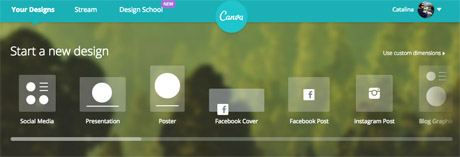
You will need to create an account to use Canva, or log in with your Facebook account. Once you're in, you can choose the type of image you want to create from the pre-existing formats, or you can choose a custom size to work with if you're creating images for your site.

canva format options
Screenshot from Canva.

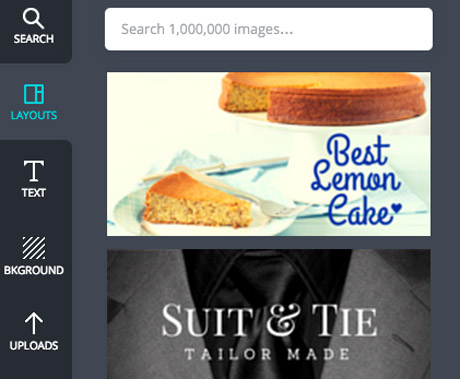
Once you've chosen your size, you can find Canva's design options on the left hand side.

It automatically takes you to the 'layouts' tab, where you can find a number of free templates for images with quotes.

But you can also create your own from scratch, uploading your own images to Canva and using the "background" and "text" options.

canva options
Screenshot from Canva.

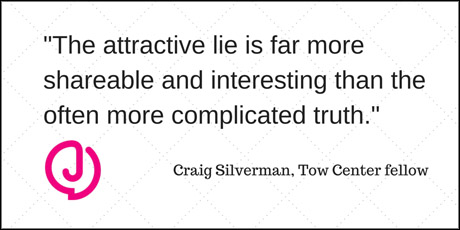
We tested the platform to create a basic image that could be used in a Twitter post, using a pull quote from our story Study: News outlets not doing enough to stop online rumours published last week.

The first step is to choose a background image or colour by clicking on the 'background' tab. The plus sign at the top opens up the colour wheel where you can find your preferred colours.

Alternatively, you can also choose one of the backgrounds provided, including free and patterned options.

Next, we uploaded the Journalism.co.uk logo, as a PNG with a transparent background, to add to our test image.

Canva allows you to either upload images from your computer, or use photos from your Facebook albums.

Once a photo is uploaded, you can drag and drop it onto your work-in-progress, resize it by dragging the corners of the image, and position it where needed within the frame.

There are plenty of ways to add text to your image, and the 'text' tab offers some basic title options as well as a number of designs if you'd like your text formatted in a more visual way.

For the quote in our image, a combination of the main title and subtitle features worked well enough, but you can also customise fonts and colours for free.

Here's the result:

test canva demo
Twitter image, resized to fit Journalism.co.uk site layout.

For more complex designs, or if you want to create infographics or illustrate statistics for social media, Canva has a number of icons and images you can use.

Click on the 'search' tab to access the platform's library of visuals, including shapes, maps, doughnut charts with percentages, and more icons to make your post stand out on social media.

Don't forget to represent your data accurately, and while Canva's design options are plentiful, don't overload your graphic. Check out these tips from freelance infographista Lulu Pinney on what makes infographics successful.

Once you're happy with your photo, you can download it or share it on Twitter, Facebook or email.

The Canva team also writes blog posts with useful tips for designing images for social media, general graphic design advice and more on their Design School blog.
https://www.journalism.co.uk/news/how-to-create-images-for-social-media-with-canva/s2/a564104/

Friday, 13 March 2015

Pinterest Bans Affiliate Marketing Links

On February 12, 2015, Pinterest announced that it would “automatically remove all affiliate links, redirects and trackers on Pins.” This is important news because merchants with affiliate marketing programs could see a drop in revenue from that channel, depending on how many affiliates use Pinterest to drive traffic.
…merchants with affiliate marketing programs could see a drop in revenue from that channel, depending on how many affiliates use Pinterest to drive traffic.
Pinterest is a social media platform that enables users to curate collections of most any online content. For example, a fashion blogger can create a collection of links to her favorite denim jeans. These collections are known as “boards,” and each link is called a “pin.”
The fashion blogger has fans that she built up via her blog. Those fans could follow her to various social media platforms, such as Facebook, Twitter, and Pinterest. And whenever those fans see a product recommendation from her, no matter what platform it’s on, they may be inclined to click through and complete a purchase. Pinterest is simply another way for bloggers to interact with their followers.
This Pinterest board, managed by New York-based blogger The Glamourai, features 290 pins related to fashion, and has 17,374 followers.
So how is this related to affiliate marketing? Say that the fashion blogger monetizes her content through affiliate marketing. She has a blog post on her site that features a review of various denim jeans, and that post contains affiliate links that her followers can click through to purchase the jeans. This is traditional affiliate marketing.

Pinterest vs. Affiliate Marketing

However, with the advent of social media, the blogger can now post those same affiliate links on Facebook, Twitter, Pinterest, and other social sites. She is simply communicating her product recommendations across multiple channels in the hopes that her followers will click her affiliate link and complete a purchase, thus generating a commission to her.
But now, Pinterest is blocking all those affiliate links. The pins remain, but the links are blocked — the pin still appears on boards, and can be shared, but click-through functionality is removed. This is not a surprise to affiliate marketers, as Pinterest has blocked isolated affiliate links in the past. But this is the first time that the website has issued a comprehensive ban on all types of affiliate marketing.

Revenue for Pinterest

The ban comes at a time when four-year-old Pinterest is considering how to generate revenue from its 70 million users. In April 2014, Pinterest launched a test for “Promoted Pins” that enabled brand advertisers to pay for promotion on a cost-per-click basis. There is also industry speculation about Pinterest partnering with payments company Stripe to add its own “buy” button to user-generated content within the next three to four months. This move could place Pinterest in the role of the affiliate.
In fact, Pinterest experimented with the affiliate role in 2012, when it partnered up with Skimlinks (an affiliate marketing tool) to auto-convert pins into affiliate links. But the Pinterest abandoned that practice after it came under fire for not disclosing the practice to its users.
By banning affiliate links, Pinterest could be paving the way for another attempt at affiliate marketing, perhaps a transparent attempt at monetization.

Reliance on Pinterest?

There are still methods for affiliates to benefit from Pinterest. For example, the fashion blogger who curated a board featuring her top denim picks could link each pin to her own blog post, which could link to the retailer’s ecommerce site for affiliate commissions. While this approach could work in the interim, affiliates should not depend on Pinterest for that traffic. If Pinterest implements a “buy” button, the blogger’s traffic from Pinterest would likely reduce. If a retailer wants to benefit from a blogger’s Pinterest following, the retailer would likely need to work directly with the blogger, outside of an affiliate relationship. The retailer could compensate the blogger for curating a board, paying her a fixed amount instead of a commission.
In short, if a retailer’s affiliates use Pinterest as part of their marketing mix, that retailer will likely see a decline in affiliate revenue based on these changes. However, affiliates that depend mainly on Pinterest for their revenue may not be adding any value to your affiliate program anyway. These affiliate are building their success off a single site, instead of creating unique value — the heart of true affiliate marketing.