Showing posts with label canva. Show all posts

Friday, 22 May 2015

Why Visual Content Is a Social Media Secret Weapon

Over the past few years there has been a noticeable shift towards visual social media content online. The emergence and power of visual platforms such as Pinterest and Instagram have highlighted the need for businesses to think visually if they want to engage with their audience online.
Social media platforms, particularly Facebook and Twitter, have redesigned their news feeds to place more emphasis on visuals. Photos on Facebook for example generate 53 per cent more likes than a text-based post. This means that if you are posting links solely featuring written text, it is unlikely that you will reach many of your followers.
Images have become ever increasingly popular with the ability for people to take photos and videos with their camera on their smartphone. If you haven't already, now is the time to start incorporating images into your social media strategy.
Why are images generating more engagement on social media? 
Images are attention grabbing pieces of 'snackable' content which users can understand and engage with ease. Images used in your social media are far more likely to evoke emotional reactions in viewers and can portray information more efficiently than text. 

2015-05-12-1431400879-3579091-FUTEtip56_smaller.jpg
As people are becoming overwhelmed with content, businesses need to start changing their social media strategy to engage with users in an inventive and exciting way. Think about what your audience wants to see on your social media channels and brainstorm the best way to interact with them.
How can you attract the attention of your viewers? 
The purpose of creating visual images on social media is to attract the attention of your audience. It is important to be original and make your content as interesting, brief, relevant and as focused to your target audience as possible.
Here are some of our ideas to attract audience attention using content as images, create:
  • How-to ideas where you discuss a step by step system
  • Quotes that offer inspiration and motivation
  • Tips to help your readers with a common problem
  • Checklists that simplify tasks and action steps
These images can be created using tools such as Canva or Picmonkey, which are easily shareable.

2015-05-12-1431400950-4657613-FUTEtip82.PNG

The images that you post on social media can help to tell your business' story and share a message. Don't be afraid to add personality to your content. People are more likely to engage and interact with a business that feels like a friend, particularly on social media. Taking regular, candid photos is an excellent way to do this and everyone loves behind-the-scenes footage.
Include images on your social media that:
  • Promote your product: Every business and brand has a product to display so don't just talk about what your products are - show them off in images.
  • Promote your workplace culture: Take regular pictures of your work colleagues and team events to share them with your audience on social media.
  • Promote your fans: Shine the spotlight on your followers and fans. By creating a business hash tag and encouraging your fans to use it when they take photos of themselves engaging with your products, you have access to a database of images. Repurpose these images on your own social media channels and give your fans their 15 minutes of fame.
  • Promote your business: Provide your followers with something they can't find anywhere else, whether it's exclusive photos, a big reveal or something they wouldn't normally see. It's a great way to let your fans know what is going on behind the scenes.
  • Promote your events: Actions shots are often the best types of images to include on your social media platforms. If you are speaking at a conference, training in a seminar or hosting a brainstorming session, capture these images and share them with your audience.
Don't forget about video
Video is a great way to give your content strategy and overall social media program a boost. Using video can present unique storytelling opportunities for businesses. Videos can be used on almost all social media platforms, including Facebook, YouTube, Twitter, Instagram and LinkedIn.
Use video to:
  • Showcase your personality: Companies can show their personality through this engaging and interactive medium. 'Wow' your audience by demonstrating how your product or services can make a difference.
  • Offer useful information: Give your users some helpful information and tips about your products and services. Think about sharing a 15 second 'how-to' video with your audience.
  • Use testimonials: Customers are your brand's greatest advocates and are a great way to tell your company's story.
Don't just stop at one image -- create a series of images to help ensure that your business always has content to use. Consider putting these images into a content calendar, which is an excellent tool to help you manage your social media platforms and ensure you are posting high quality, interesting content.

Monday, 11 May 2015

How To Chose Amazing Images And Create Stunning Visual Content


It’s often said that to achieve success in content marketing, brands should “act like a publisher.” But how do publishers act? What should brands specifically be emulating? For our second installment of our “Ask an Editor” series, I sat down with Vicky Wasik, Visual Editor at Serious Eats, to learn how to create a beautiful and compelling content hub.
Wasik is a Brooklyn-based photographer specializing in food, events, portraits, and travel photography. Her photographs have been featured in print and online by publications including Conde Nast TravelerThe Huffington Post, Edible Brooklyn, Edible Manhattan, New Orleans Magazine, The Village Voice, and The New York Times. She also has worked with brands such as Whole Foods, Oreo, Walmart, Plated, Chivas Regal, and Barilla.

What websites do you look to for design inspiration?

Vicky Wasik: Lucky Peach uses some really interesting graphics and illustrations for their features (this Chinese dumpling guide is one of my favorites). I think Bloomberg has some really strong photography that blurs the line between editorial and photojournalism: this Iceland feature is so cool. The images are huge and beautiful, and it feels like you’re scrolling through a magazine rather than down a webpage.
image: http://cdn.business2community.com/wp-content/uploads/2015/05/2e82a53c6f9e74ed281ad92980ec654c-900x515.jpg
Ask an Editor

Illustration by Monica Ramos for Lucky Peach

What are some tips for choosing an authentic image?

If an image looks too staged, fake, or uninteresting, skip it. For example, if I’m looking for a photo of a chili pepper, I’ll look for something with personality and texture, even a little imperfection. This shot


Ask an Editor

…with the warm wood and nice depth of field is way more appealing to me than this one on a plain white background.

What are your guidelines for selecting images?

I always make sure the image is consistent with whatever content it is supporting. My job is to select the primary image for each post that will be used across our social media platforms, on our homepage, and at the top of the post, so it should be relevant to the story and compel someone to click on the link.
For example, maybe I have a story about making peach pie, and the best image from the story is a beautiful shot of flour being sifted onto a surface. Even though it’s a really strong shot, out of context it doesn’t really tell you what the story is about, so I’ll probably choose something that at the very least shows a pie crust, maybe even some peaches. The flour-dusting image can be used later in the post.

Ask an Editor

Photo: Vicky Wasik for Serious Eats

What is the most overlooked aspect of image selection?

Context. It’s so important to make sure the image you select makes sense in the context of the article it supports or represents. For example, one of the first stories I edited for Serious Eats had to do with absinthe. I knew I had a great image from an old shoot I did at a bar of the absinthe being poured out of one of those fancy drip dispensers over a burning sugar cube, which, it turns out, was specifically called out in the article as being the wrong way to do it. So even though it was a great photo, it was the wrong choice for this article.
Photo: Vicky Wasik for Serious Eats

How do you maintain a consistent visual identity across platforms and social channels?

At Serious Eats, we pull images from our posts and use them with quotes or leads that will compel someone on Facebook or Twitter to click on the link. Pinterest is also huge for us in terms of sharing recipes and cooking tips/techniques. Something we’re starting to do more of is using collages like this one with text overlay to draw in more readers from Pinterest. On Instagram, we alternate between using more candid behind-the-scenes shots and actual recipe “beauty” shots. We see social media as a way to show off our personality, not just duplicate already published material.
Our tagline is “The Destination for Delicious” so every image we use needs to echo that statement. We recently published this guide on Where to Eat Chinese Food in NYC and decided to use illustrations as the main design component of the page. We didn’t want to go too far from our food photos, but we still wanted to add a little bit of whimsy.

What are some of the biggest mistakes you see brands and publications making when it comes to their visual identity or image selection?

The new trend is to use photographs that are bigger and better, which is great, but often the images are blown up too much and look super pixelated if they don’t have a high enough resolution. It’s important to check that the size of your image is appropriate for the size of the space on your website.

Do you have any tips for thinking outside-the-box with image selection (for example, something to represent a business instead of a computer)?

Whenever I’m stuck trying to figure out an image and I don’t want to go the obvious route, I’ll either re-read the text or talk to the writer or editor about the article to get a better sense of it. Sometimes just having a quick conversation can highlight an aspect of the story that you didn’t see before or that might not be obvious, but can inspire you to look for a different type of image. I’m also a big fan of using the “related image” section of a stock site and spending some time going down that wormhole.

Key Takeaways for Brands:

  • Make sure your images make sense in the context of your content.
  • Try not to use staged or uninteresting stock photos. Instead, look for photos with personality and texture.
  • Think outside the box when it comes to visuals – consider illustrations and graphics as well as photographs.
  • Be strategic with your visual identity across platforms. What you post on Pinterest might be different than what you post on Instagram.

Sunday, 10 May 2015

​Australian startup Canva raises $6 million

Australian online design platform startup Canva has raised $6 million (AU$7.67 million) in additional funding led by Silicon Valley's Matrix Partners and Shasta Ventures, along with local VC players Blackbird Ventures and AirTree Ventures.
The latest capital injection pushes the Sydney-based company's total fundraising tally well over $12 million, adding to its $3.6 million funding round completed in July last year, and its initial $3 million seed funding round in early 2013.
The company, which operates a platform that combines a host of editing and online collaboration tools with over 1 million images and hundreds of free design elements, plans to pump the new funding into the impending rollout of its new "Canva for Work" product, due for launch in June.
According to a Canva representative, the additional investment will be used to bulk up the company's Sydney-based engineering team in order to build the new product, and will also be funnelled into marketing and promoting Canva for Work.
The new offering is a subscription-based product intended to see the company broaden its customer base to include larger organisations. As an additional product, it departs from the company's existing model, which lets people use the platform for free and purchase images for $1 apiece.
"Ever since we launched, we've been flooded with interest from a broad spectrum of companies, from large multinationals and franchises to design agencies, startups, and even real estate agents who want to ensure consistent branding across their marketing materials and documents," said Canva co-founder and CEO Melanie Perkins.
Over the past 20 months, Canva has grown its user base to 2.4 million, collectively creating more than 15 million designs, with over 200,000 organisations represented on its platform.
"Canva is one of those very rare companies that experiences rapid growth as a utility tool," said Matrix Partners' Josh Hannah. "It's phenomenal to see the fan base behind Canva and the immense potential of their new product."
In April 2014, Canva took on Apple's former chief evangelist Guy Kawasaki to help build its brand internationally.
"It's so WYSIWYG; there's no programming, it's just a beautiful, beautiful thing. So I came out of semi-autonomous retirement, and now I'm a full-time employee of Canva. Canva is my life right now," he said in July last year.

Friday, 1 May 2015

4 ways to create effective visuals for social media

social images
Marketers keep talking about the need for original content that is able to create authentic and engaging experiences for consumers. Consumers want to connect with brands that provide engaging, useful and quality content. It has been shown by several studies, tests and the growth of visual content platforms like Pinterest, Instagram, etc. that visuals are key in creating unique experiences.
OpenView Marketing Labs reported that company Facebook pages posting status updates with visuals in the form of videos and photos create up to 180 per cent stronger engagement. Visual content can ensure that readers spent more time on site which increases their changes of conversion. However, with increasing opportunities, the time a marketer has remains constant. We can’t add an hour to a day, but we can surely add a range of methods and tools that can make your day more efficient!
1. Use online tools: Plenty of digital tools are available currently to help designers, web developers and marketers to bank on. Some of my favourite ones include:
  • For infographics: Piktochart, Visual.ly
  • For visual design on social media: Canva, Pagemodo
  • For visual editing: Photoshop, PicMonkey
  • For images: Getty, Flickr, Unsplash, You own camera
2. Curate data and information: Many large and small companies are full of data that is somehow never used. It moves between one department to another almost every time falling through the cracks. As much as 60 per cent content in SAP was “unused” as per an ex SAP VP of Content. Data numbers from a proprietary database or company presentations and spreadsheets can be  visually represented in the form of infographics, photo stories, videos, and other visual content.
3. Customise your visuals: It is important to use visuals according to the networks that you’re posting on. From Google+ to Twitter to Facebook, all these networks have cover images, post images, profile images all differing in ideal size dimensions. It is important to adhere to these unless you want to lose brand impact by cropped images that look unprofessional. Tools like Canva or guides such as these offer guidelines and help. All visual content of course has to be in line with your brand tonality and presence. And before you start off on an image posting spree on all networks, ensure you are monitoring and approving posts that are relevant to your brand. Using tools is helpful in this case.
One option is, for instance, using approval tools like Outbox Pro allowing you to keep track of how you share by giving you an approval mechanism so you can customise per network. LinkedIn has recently announced a new tool Elevate, but will only be available by invite at the end of this year and is sadly limited just to LinkedIn content initially.
4. Don’t steal: Stealing means using images from “Google search” or any other means you used to find the images without giving credits to the original creator. Many on the Internet operate using the creative commons license but still require you to give them an attribution (name, source, link) back if you use their images. I recently found a classic conversation between the original creator and the person using the image without the credits on LinkedIn. The conversation spanned over several Tweets and people on Twitter basically portrayed the user as a plagiarist.
As a brand, it is a serious issue and you can be left with legal cases and a severe brand damage and embarrassment if you do not adhere to simple principles. As a brand manager, if you’re not sure what your team is up to, ensure you avoid embarrassment by having a training and approval system in place.
And lastly, have fun with the content!

Monday, 20 April 2015

How To Improve Your Content Marketing With Canva

image: http://cdn.business2community.com/wp-content/uploads/2015/04/improve-content-marketing-canva.jpg.jpg
improve-content-marketing-canva

Images are an integral part of content marketing, they are required not just for blog posts, slides or infographics but for posts to social media itself. One of the challenges for content marketers is producing professional images quickly and efficiently. Your new best friend is Canva, an image tool designed for content marketers.

Images Matter in Content Marketing

At BuzzSumo we love data and the data on the importance of images is unequivocal. 93% of the most engaging posts on Facebook are images. According to Neil Patel blog posts with images get up to 9 times more views than posts without images. Our own BuzzSumo study of 100 million articles found that articles with images got twice as many social shares as posts without images.
images post

The power of images was demonstrated only last week by a Guardian post on Overpopulation and Overconsumption. The article amassed over 300,000 shares very quickly, ten times more than any of the Guardian’s other content last week. The post included dramatic images such as the one by Zak Noyle below, see more at @zaknoyle.

image: http://cdn.business2community.com/wp-content/uploads/2015/04/surfer-zak-noyle.jpg.jpg
surfer-zak-noyle

Images not only matter in blog posts or slides but in social media posts themselves including Facebook posts, LinkedIn updates, Google Plus posts and even Tweets. For example, you get much more attention in a Twitter stream by including images.
image: http://cdn.business2community.com/wp-content/uploads/2015/04/twitter-image.jpg.jpg
twitter stream image

The post from Martin stands out very clearly in the stream above. Guy Kawaski recommends that you use an image with every tweet.

Why Canva?

If you are part of a large content maarketing team you may have the luxury of access to designers or graphic artists. Even if you do, there will be times when you need produce images quickly but images which are also professional and reflect well on your brand. What you need is a tool that is easy to use, quick, flexible and that produces great images. Thanks to Guy Kawasaki and Peg Fitzpatrick your prayers have been answered. They have produced Canva, an image tool that has an easy to use interface but which also produces beautiful graphics.
The team at Canva really understand social media and this is more important than you might think. Whilst you can use sophisticated tools like Photoshop or Pix.lr, the Canva team understand the challenges you face in social media and have designed the tool around your needs.
This is immediately obvious when you open Canva. They have formats and image sizes set up for all your key images, some examples are shown below.
image: http://cdn2.business2community.com/wp-content/uploads/2015/04/canva-templates.jpg.jpg
canva-templates

Once you chose a format you can start creating your image. Canva are always ahead of you, thinking about what you need. For example, it is currently Easter and when I open up the format for my Twitter post image, Canva includes in the layout choices a range of Easter images that I can quickly change and edit.
image: http://cdn.business2community.com/wp-content/uploads/2015/04/canva-easter.jpg.jpg
canva easter

Canva allows you to quickly edit text and colours. They start with a simple palette but you can add your own colours.
image: http://cdn2.business2community.com/wp-content/uploads/2015/04/buzzsumo-easter.png.png
buzzsumo-easter

Canva provides a wide range of icons and images. Within the tool you can search their library of over 1m images. There is a good mix of free and paid images, which are typically $1. Whilst Canva’s Premium options are tempting, they also allow you to upload your own photos or graphics.
Canva have a wide range of icons, charts and images. For example, below is a search for ‘social media’ images which brings up all the logos and images I need.
image: http://cdn2.business2community.com/wp-content/uploads/2015/04/canva-social-media.jpg.jpg
canva-social-media

The Canva interface is a joy to use, just drag across an image, text box or icon. For example, I can search for a PC, find the image I want and then drag this across to my design. To make this image my own I can add an image to the PC. I simply upload my image of the Chicago bean and then drag this to the PC screen and Canva drops it in automatically. Job done! See above image.
Adding text is a breeze. Just choose a text style from the left column and drag it over to your image. Then you can adjust, change and color as you wish.
If you are not using Canva, what are you waiting for? Did I mention it is also free? Yep, free. You can pay $1 for their library photos or upload your own. Head over to Canva’s site immediately. They have lots of guides and tutorials, not that you need them with this intuitive tool. In less than ten minutes you will be producing beautiful graphics to enhance your content marketing.

Tuesday, 7 April 2015

10 Tips for Using Visual Media to Improve Your Business

040615 pinterest visual
Interesting visuals can make a huge impact on your website and online marketing efforts, whether they be photos, videos or other forms of media. Social platforms like Instagram, Pinterest and even Meerkat have made these visual forms of media even more prominent.
Members of our small business community have some tips for using each of these visual platforms and for including visual elements on business websites. Read on for the full list of tips in this week’s Small Business Trends community roundup.

Find Free Images for Your Blog

(Custard)
Photos can help you add some much needed visual interest to your blog posts. So if your business is not one that creates its own original visual content, you should look into finding some other images to use (legally) with your blog posts. Here, Matt Fielding provides a list of some resources where you can look for free images.

Use These Instagram Analytics Tools

(Talkwalker Blog)
Instagram is one of the fastest growing social platforms. So if your business has any kind of visual content to share, you’re likely already using it. Whether you’re already on Instagram or just considering starting an account, analytics can be helpful in growing a following on the platform. And Richard Sunley shares five of those analytics tools here.

Build a Successful Instagram Account

(Headlines)
Since so many people and businesses are using Instagram, it can be difficult to make your account stand out. To make your Instagram presence a success, it can be helpful to look at others who have used the the tool effectively. That’s why Martin Smith shares a case study about Instagram success here.

Brand Your Pinterest Page

(MadeFreshly)
Pinterest can be another useful social platform for sharing visuals. Brands use the platform in many different ways. But it’s important to really make it your own. Inthis post, Elizabeth Fein shares some tips for branding your Pinterest page effectively.

Learn About Meerkat

(DIY Marketers)
Video content can be a great way to add some visual interest to your content marketing efforts. And now that video content can be streamed live to your social media followers, thanks to Meerkat. Ivana Taylor shares more about the Meerkatapp here. BizSugar members also share their thoughts on the app.

Consider Mobile Video Ads

(Marketing Land)
In general, online and mobile videos can increase engagement and visibility for businesses. And as it turns out, the same can be said about videos used in advertising. According to this post by Ginny Marvin, mobile video ads are five times more engaging than standard banner ads.

Learn if Your Website is Mobile Friendly

(Entrepreneurship)
Since most customers are now using mobile devices to access the Internet, having a site that is mobile friendly is more important than ever. But if you’re not quite sure what your website might look like on different mobile devices, there’s a simple way to find out. Michael Hartzell shares a bit about that tool, along with some tips for going mobile friendly here. And the BizSugar community comments on the post as well.

Optimize Images for WordPress Speed

(WP Curve)
Images can almost certainly benefit your business website. But too many images, or images in the wrong format, can slow down your site. To ensure that you can use visuals on your website without slowing it down, consider these tips from Kyle Gray.

Use These Content Solutions for B2B Marketing

(Ron Sela)
Marketing a B2B business is a lot different than marketing a B2C company. The visuals and other content are likely to be a bit more focused. But producing interesting content is still important. Here, Rosemary Brown shares some tips for creating great B2B marketing content. And BizSugar members discuss the post further as well.

Consider Translating Your Website

(Small Biz Daily)
Your website is the online face of your business. And while photos and other visuals are important, most customers still want to be able to read what your business is all about. Depending on your client base, that could make it necessary for you to translate your website. Stephen Pritchard discusses the pros and cons of translating your site here.
Help us make the community roundup posts even better each week. Suggest content to feature. Send your recommendations to sbtips@gmail.com or simply submit posts to the BizSugar community.

Sunday, 5 April 2015

2 min read How to Design the Perfect Logo (Infographic)

How to Design the Perfect Logo (Infographic)
Close your eyes and imagine Apple’s logo. Now think of Nike’s. How about Target’s? We’re willing to bet that you conjured up images for each in your mind’s eye in less than a second or so. They’re that memorable.
As you can see, logos are so much more than simple symbols. They’re epic icons. Logos are the face of your company, the deliverers of the all-important lasting impression, crucial visual representations of your business, what you do and what you’re about. Accordingly, the utmost care and meticulousness should be taken when designing yours. If you already have a logo, the same goes for redesigning it. Spare no attention to detail.
From the font to the color, to the use of negative space and beyond, the aesthetic elements of a logo greatly impact how your company (and its offerings) are perceived by customers.
Does it attract them or repel them? Does it stand out or fade into the background? Does it distinctly identify your brand or confuse it with your competitors? These are all critical questions to ask during the research and design phase, but far from the only ones, only a smattering of the main ingredients for the master recipe for cooking up a successful logo.
Check out the famous logo-packed CompanyFolders infographic below for a complete list of specific, actionable tips and ideas to help you design the best logo possible for your brand.
Click to Enlarge+
design business logo (Infographic)

Saturday, 28 March 2015

How to create a quick blog or social media image with Canva for iPad

Canva is a terrific tool for creating all sorts of designs quickly and easily. From social media images such as Facebook covers, Pinterest graphics, or Instagram posts to blog graphics, invitations, and business cards, Canva can do it all.
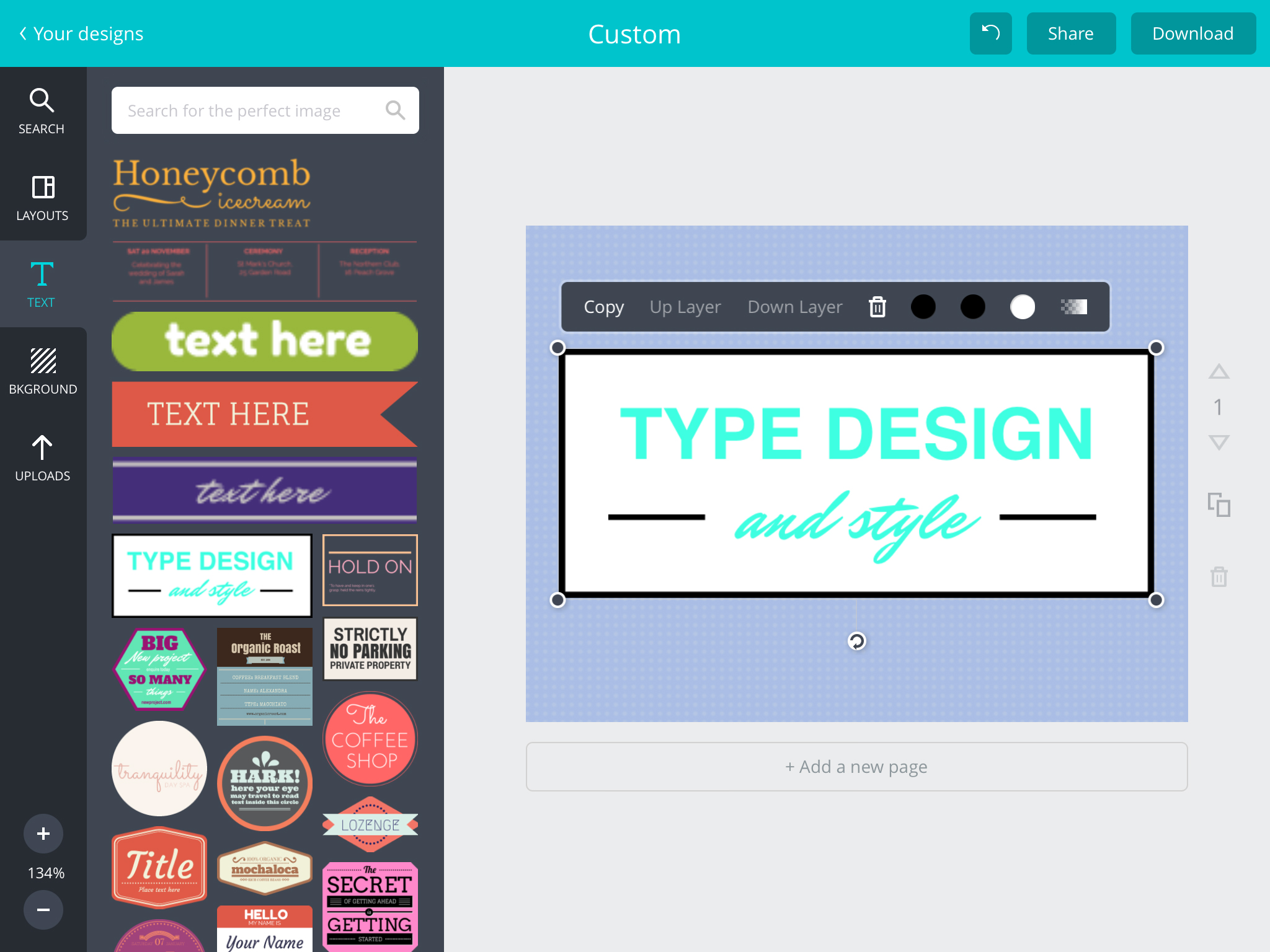
After you download the app to your iPad and create a free account, you are presented with options to choose which type of design you would like to create. If you do not see what you want in the scrollable list across the top, you can choose “Custom” and enter your own dimensions to get started.
The next screen is where the fun begins. Canva has many items for you to choose from which are categorized by group. There are banners, text holders, frames, buttons, icons, and more. If you plan to spend some time on your design, Canva offers layouts that are really helpful for arranging the pieces of your design. But, if you want to put together something in a hurry you can start with just a basic background from the options available by selecting a pattern and color to get started.
To use any item you choose from the left, you can either click it or hold and drag it onto your canvas on the right.
Canva First Item
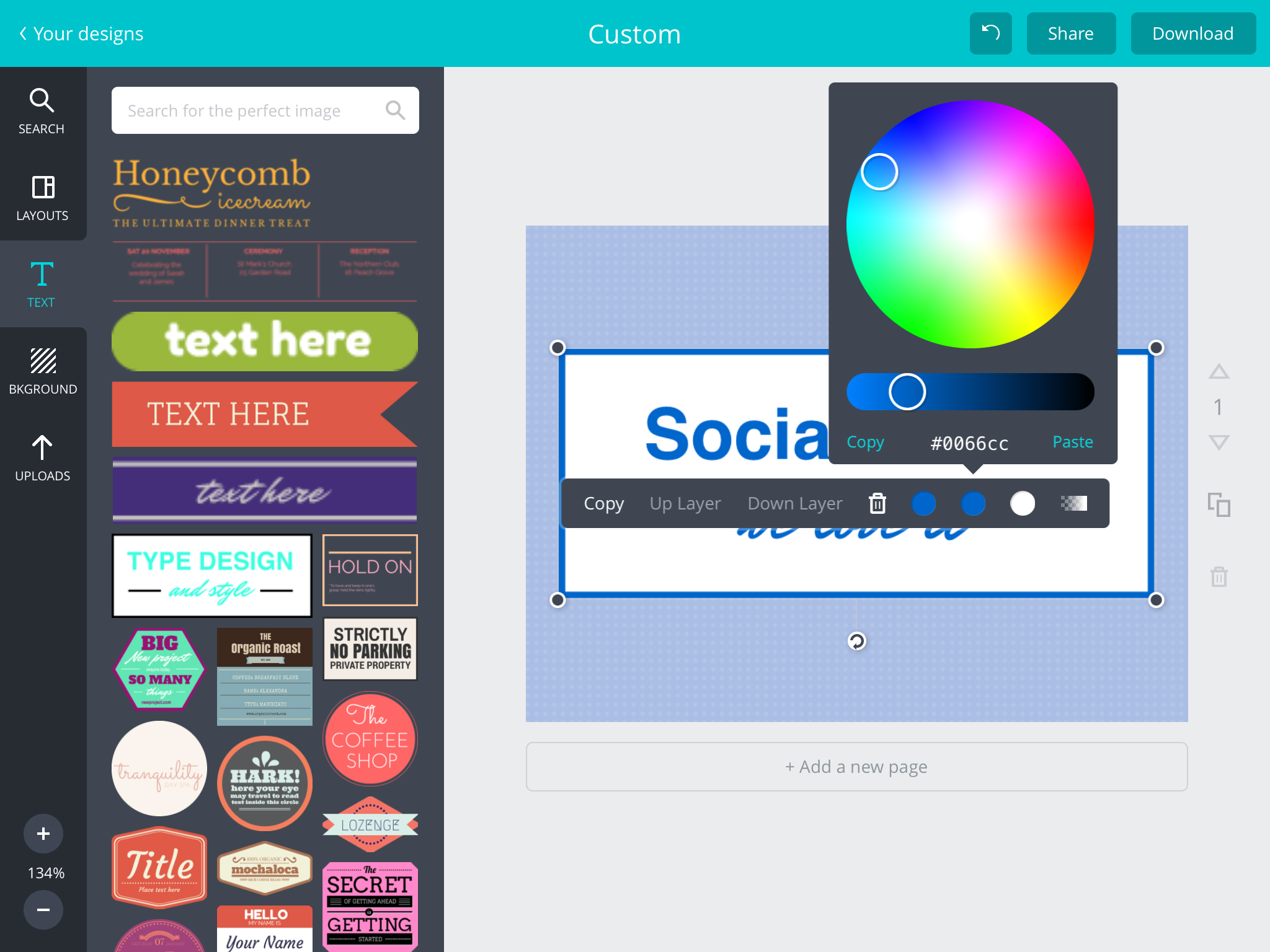
Once an item appears on the canvas, you can hold and move it to resize, rotate, or change its location. Next, just tap any item you have placed on the canvas to edit it. You can normally change colors, layer location, transparency, copy, and delete an item. There is a built-in color palette, but you can also pick a custom color.
Canva Colors
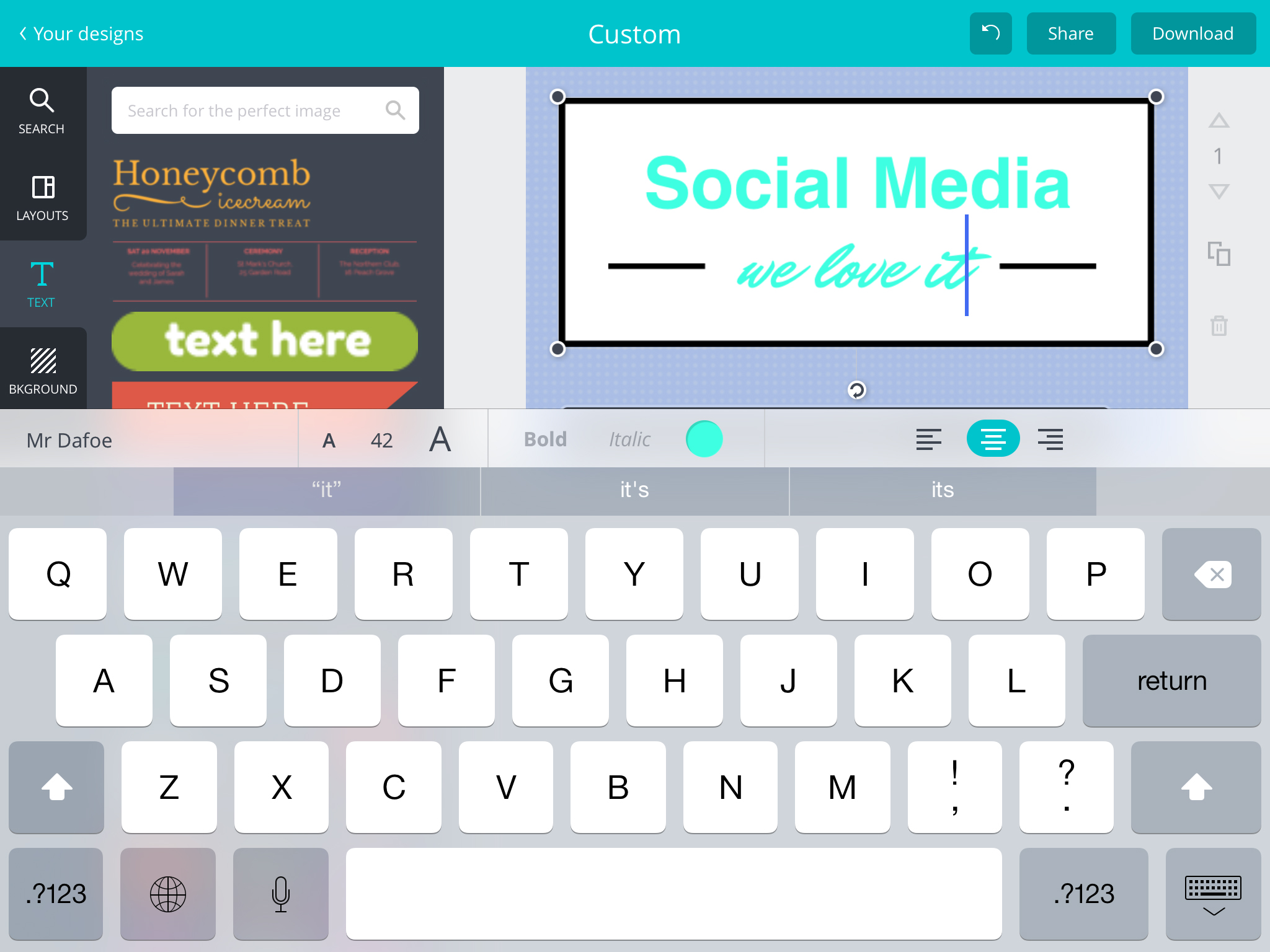
When formatting text, the iPad keyboard will appear with your options for font style, bold, italics, color, size, and alignment.
Canva Text
You have the ability to add more pages to your canvas by clicking the “Add new page” area or selecting the arrow next to the canvas. You can copy and delete pages here as well.
If you have an image of your own that you would like to start with or add to the design the upload feature works great. There is also a search option within your upload area along with a button to take a picture using your iPad’s camera.
Once you have completed your design you can download it as a .png or .pdf file or share it directly to another location such as Facebook, Twitter, Pinterest, or any other location you have added to your “Share” area.
Canva Final
The nice thing about Canva is that it automatically saves your designs as you are working on them. So, there is no fear of losing an image that you have spent time on because you forgot to save it. All designs you have created are displayed on the main screen after you have logged into the app. Each design can be copied or deleted from there. Or, you can just open the design back up for editing.
Most items and images within Canva are free to use, however, there are also in-app purchases available for some items. You can purchase one item or a pack. But, with the many free items Canva offers, you can normally find just what you need.
Canva is currently available for the iPad only. The app is free with in-app purchase options on the App Store.

Tuesday, 24 March 2015

Why Visual Content Will Explode In 2015

Over the past few years, content marketing has seen an explosive growth, and it shows no signs of slowing down. While the Internet abounds in reports and surveys that highlight this trend, I’m going to share with you two very insightful stats related to the boom:
With companies across every industry turning to content as a way to engage a new breed of buyers, we are starting to see a need for maturity and evolution in content marketing. While so many companies are now proclaiming to do content marketing, not everyone is doing it right. There’s less fresh and original content, and more rehashed stuff, which is making the online space reek of that same old regurgitated content.
Clearly, we have reached a point where the work we are doing needs to change.Change how? Various marketing gurus are prescribing various formulas for the coming year. But, I believe that change will be driven by something a handful of astute marketers are already doing: visual content. I think visual content will take center stage in content strategy, making it a critical component in 2015.
Visual Content
Source: Creative Commons
Breaking the Mold with Visual Content
Plain, boring text is passé; visual is in. Science reports that we respond to visual stimulation much better then optical. In the case of reading, our brain decodes visual information 60,000X faster than text. It’s not surprising that YouTube has become the 2nd largest search engine next to Google GOOGL +0.16%. Sites like Pinterest and Instagram have risen to popularity, and storytelling as the most effective branding strategy is gaining momentum. All fingers are pointing at one direction – visual content is growing bigger, and that’s where the future of content marketing is headed.
More YouTube

The rise of video as a brand marketing channel will become bigger and better than ever in 2015. Brands will flock to YouTube. What’s more compelling is that with YouTube, brands have the option of taking their influencer campaigns to a whole new level. By getting people with YouTube clout to feature in their videos, brands are sure to grab more eyeballs than before.
More SlideShare
SlideShare will become your go-to destination for repurposing existing content that you may have created for blogs, eBooks, podcasts, and more. Turning that content into sleek presentations is a great way to breathe new life into them. Not only this, presentations will make visual storytelling so much more interesting, which will have brands spending quite a lot of time on SlideShare, creating and sharing presentations with their consumers.
More Infographics
Content like infographics and data visualizations will become great alternatives to data-rich text. With infographics, you can blast out stats and facts to your audience in fun and creative ways that will keep them engaged in a way that text cannot. These visual and sharable pieces are received well. When given a choice between reading pages of text or an infographic, the infographic is sure to win out.
More Memes and Imagery
These days memes are everywhere in social media. And the trend is only going to get better in 2015. As trending hashtags like: #BreakTheInternet, #AlexFromTarget, and #Bendgate sensationalized the web, memes pushed them over the top and into the category of Internet’s latest obsession. Consumers can’t seem to get enough; so we’re going to see more of these in the coming year.
While we all know these forms of visual content aren’t new, what will be new is seeing more companies utilizing them. If you go to many company websites today, you still find written content primarily. With more options to creatively present information and upcycle older content, brands are going to be giving viewers access to the information they want in the format that they want. I predict that this explosion of visual content will be the next big wave in content marketing.