Showing posts with label photos. Show all posts

Monday, 13 April 2015

8 Tools That Help You Perform Day-to-Day Tasks More Efficiently

8 Tools That Help You Perform Day-to-Day Tasks More Efficiently

Every entrepreneur would love to be more productive and complete day-to-day tasks more efficiently, resulting in more time to allocate towards business growth.
With so many web-based tools and software to choose from, it can be quite overwhelming. I’ve put together a list of my eight favorite tools that I have used personally as well as have seen implemented by successful online business owners I deal with on a daily basis.

1. Hootsuite

Hootsuite is a social media-management tool suitable for businesses of all sizes. With over 10 million active users, this is one of the most user-friendly social media-management dashboards in existence. Smaller organizations can easily schedule Facebook posts and Tweets as well as monitor their social media return on investment with custom analytic reports.
Larger organizations can manage full-blown social campaigns among multiple users, departments and locations. While it can help larger companies better manage their social media staff, it can also help new startups that can’t afford to hire a full-time dedicated social media manager properly execute campaigns.

2. Basecamp

Organization is key -- if you are constantly searching through your email inbox to find messages or shuffling through sticky notes to locate information then you need Basecamp in your life. This tool is great for project management -- both internal tasks as well as client projects. You can quickly communicate with members of your team, clients, vendors and freelancers all in one place.
Having a simple project-management solution allows you to easily look in one place to get a complete status update. You can eliminate phone calls, emails and meetings -- everyone is literally on the same page.

3. FreshBooks

Accounting can be a complete nightmare and time suck, but thanks toFreshBooks you can easily track expenses, create and send invoices, and handle all of your business accounting in a single dashboard. You can quickly see how much money you have in outstanding invoices, and you can see when clients opened and viewed invoices. This eliminates the classic “I never received it” excuse, as you can see the exact date and time that the invoice was opened and viewed.
The ability to create invoices on the go will actually help you get paid faster as well. Your team can create invoices and bill clients before they even leave an office or meeting. As entrepreneurs we all want to get paid faster, and this is a tool that definitely helps to facilitate that.

4. Drip

There are several email-marketing solutions, but Drip tops my list for many reasons. Some other options do one or two things very well while lacking in other areas, while this piece of software does everything very well. The product is perfect if you actively market content. Write an ebook, put together an email sequence and let Drip do the hard work for you.
We use Drip at FE International to automate our email sequences and feed content to relevant people. It helps build trust, credibility and is simple to use -- great for non-techies like myself!

5. Dropbox

Entrepreneurs are becoming more mobile by the year. Having remote workers located all over the globe is a common occurrence in most startups, and a tool such as Dropbox allows you to securely store documents and files in one place, making it easy to share them with anyone.
Dropbox not only frees up space on your computer, but it also makes sure you never lose a file again. No more needing to send presentations out to team members via email. No more worrying about employees keeping files safe. This gives you security, convenience and peace of mind.

6. Parsely

You have probably heard about the importance of content marketing several times. In fact, you are probably publishing content on your blog regularly -- but do you know if it is working? How is your audience responding to your content? What kind of ROI is your content marketing returning? Parsely is a tool that answers these questions for you.
When you can quickly identify content strategies that are working to expand your online reach it allows you to spend more time producing more content and less time trying to fire out what is working and what isn’t. Focusing all of your content production around strategies that are proven to work means you will experience a higher ROI from your campaign.

7. Desk

Providing excellent customer service is a must for any business, andDesk, an application from SalesForce, can help you provide effortless customer service. With this app you can begin to offer online customer support -- answering pre-sale questions as well as addressing complaints quickly before they develop into major fires. You can look at data and see how long it takes to answer customer service inquiries, allowing you to establish benchmark response times to strive for or beat.
One of the other great features is the self-help option, which allows you to publish answers to common questions and for individuals to search the knowledge pool before submitting a support request. A thorough knowledge pool can help eliminate a significant amount of customer support inquiries -- this reduces your expenses and work force.

8. GoToMeeting

As I mentioned above, remote working is common among startups and even large established companies are converting positions into remote jobs, allowing their employees to work from home. GoToMeeting allows you to conduct video conferences in HD quality, share your screen -- desktop or iPad -- with your audience, and record the entire meeting to share with those that couldn’t make it.
Not only is this tool great for organizations to use internally, but it can also be used to conduct webinars to generate leads or to offer demonstrations to potential clients. The days of the traditional conference call are long gone -- video conferencing is the new standard.

Saturday, 14 March 2015

Creating images for social media with Canva

paints colour images drawing design
Credit: By sayot on Flickr. Some rights reserved.
Posts with images on social networks often attract more engagement than text-based updates, so if you need to spruce up your social channels, posting more images is a good way to go about doing that.

But each social network has its own requirements in terms of format, and there's no one-size-fits-all for social networks.

There are a number of tools online that can help you create bespoke images for the various social networks journalists use to share their stories – Canva is one such platform.

It caters to users who need an easy way to design images in a number of styles, from Instagram or Facebook photos to Twitter headers and Pinterest images, and even email headers you could use in newsletters.

Many of Canva's design tools are free to use, and you can access most of its library of templates, fonts and even images for free. Certain elements however are paid-for, and usually cost $1 each (payable when you download your finished image).

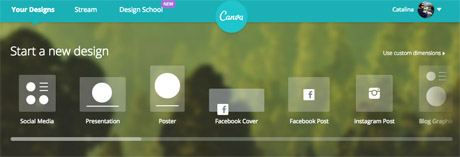
You will need to create an account to use Canva, or log in with your Facebook account. Once you're in, you can choose the type of image you want to create from the pre-existing formats, or you can choose a custom size to work with if you're creating images for your site.

canva format options
Screenshot from Canva.

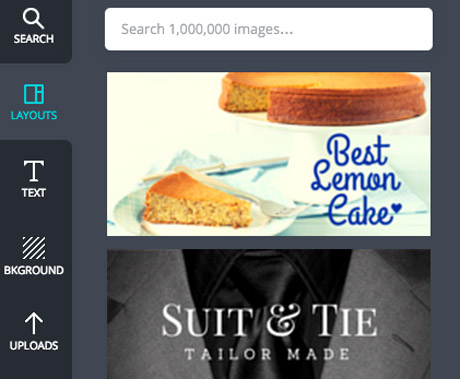
Once you've chosen your size, you can find Canva's design options on the left hand side.

It automatically takes you to the 'layouts' tab, where you can find a number of free templates for images with quotes.

But you can also create your own from scratch, uploading your own images to Canva and using the "background" and "text" options.

canva options
Screenshot from Canva.

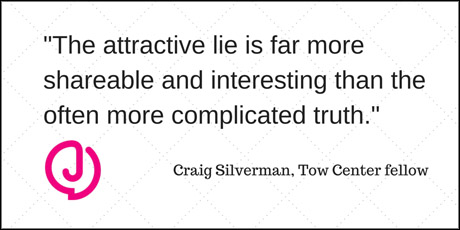
We tested the platform to create a basic image that could be used in a Twitter post, using a pull quote from our story Study: News outlets not doing enough to stop online rumours published last week.

The first step is to choose a background image or colour by clicking on the 'background' tab. The plus sign at the top opens up the colour wheel where you can find your preferred colours.

Alternatively, you can also choose one of the backgrounds provided, including free and patterned options.

Next, we uploaded the Journalism.co.uk logo, as a PNG with a transparent background, to add to our test image.

Canva allows you to either upload images from your computer, or use photos from your Facebook albums.

Once a photo is uploaded, you can drag and drop it onto your work-in-progress, resize it by dragging the corners of the image, and position it where needed within the frame.

There are plenty of ways to add text to your image, and the 'text' tab offers some basic title options as well as a number of designs if you'd like your text formatted in a more visual way.

For the quote in our image, a combination of the main title and subtitle features worked well enough, but you can also customise fonts and colours for free.

Here's the result:

test canva demo
Twitter image, resized to fit Journalism.co.uk site layout.

For more complex designs, or if you want to create infographics or illustrate statistics for social media, Canva has a number of icons and images you can use.

Click on the 'search' tab to access the platform's library of visuals, including shapes, maps, doughnut charts with percentages, and more icons to make your post stand out on social media.

Don't forget to represent your data accurately, and while Canva's design options are plentiful, don't overload your graphic. Check out these tips from freelance infographista Lulu Pinney on what makes infographics successful.

Once you're happy with your photo, you can download it or share it on Twitter, Facebook or email.

The Canva team also writes blog posts with useful tips for designing images for social media, general graphic design advice and more on their Design School blog.
https://www.journalism.co.uk/news/how-to-create-images-for-social-media-with-canva/s2/a564104/

Saturday, 7 March 2015

5 Mistakes Businesses should AVOID with Infographics


Shutterstock_197903273Infographics are proven traffic generators. They offer infotainment with their eye-catching designs and concise information, and they have the power to add some serious oomph to your content marketing strategy, and in turn, your revenue.
It’s important to note, however, that success is not guaranteed. It would be naive to assume that one could simply throw an infographic into the void and watch as web traffic and sales shot through the roof like magic. Don’t get me wrong; that would be great, but the reality is that readers—aka your current (and future) customers— are quick to reject poorly presented infographics.
Here are five mistakes to avoid when creating an infographic for your business!

1. Text Overload

The charm of infographics lies in their ability to present data in a visual manner that is easily digestible to quickly engage the viewer. But if an infographic fails to depict the information visually and forces you to add a lot of supporting text then it has failed in its primary motive. It’s a letdown for the reader. Even a regular bar chart, suitably dressed up can be used as an infographic, the point being, keep the experience visual.

2. Lackluster Content

An unoriginal infographic reeks of laziness even if the data has been presented in an interesting manner. Poorly chosen topics tantamount to taking readers for granted. It’s as if you’re mass manufacturing poor quality infographics to make the most of the demand. Bland facts about a topic spruced up and presented as an infographic leave readers with a poor taste in the mouth. Keep things fresh, and research your topic thoroughly in order to come up with new and compelling content.

3. Overly Complex Content

Just as a vague infographic is bad for business, so too is one that is overcomplicated. An infographic too complex to be understood in a glance or even a single reading is unlikely to resonate with your intended audience. If readers have to spend time and energy deciphering your content, then you can kiss prospective shares and desired backlinks goodbye. The solution is to break down a complex topic into smaller, easy-to-grasp portions and tie them to a whole.

4. Excessive Self-Promotion

Of course you want your infographic to lend itself to the promotion of your product or service—but—in order to be successful, you have to do this in a strategic and subtle way. A sure way to leave visitors feeling cheated is to promise one thing in the title or intro, and then proceed to deliver nothing more than a promotional pitch for your business, with little information or substance. Branding is expected, but over promotion is a temptation best avoided.

5. Poor Use Of Colors And Typography

Colors and fonts make a big difference. If your choice of colors makes the reader work hard to digest the information, you haven’t really succeeded with your efforts. Choosing no more than three colors, their shades and black and white is a safe approach, and the lightest color should ideally serve as the background. Fonts are also powerful, and they subtly convey messages about your brand, so choose them wisely. For example, if you wish to project an image of reliability, then Baskerville Old Face may be a good choice. Comic Sans, on the other hand, would be a poor choice due to its cartoonish nature and inherent playfulness.

The Moral Of The Story

Bad infographics are destined for a quiet online burial, and that’s definitely not what you want for your business. In order to be successful, your visual content needs to be conceived and executed right. For many business owners or marketing managers, this means hiring a professional design firm to create your infographic for you.
It may cost a little bit of money, but in the scheme of things, the potential ROI is much greater because the people creating your infographic will know exactly what works and what doesn’t, and they’ll have expert answers for any questions you may have about visual content.
If you don’t have an in-house team or professional writers and designers, take my advice and look into some other options.
Regardless of how you go about creating an infographic for your business, the key takeaways here are to focus on quality content, expert design, and most importantly, always avoid the five success-killing mistakes I’ve listed above.

Wednesday, 11 February 2015

Pinterest: how to market your business with the social media site

pinterest

Think Pinterest is just for people to post pictures of lovely lounges, crocheted owls or ice cream? Think again. While it can be lovely – not to mention incredibly distracting – to spend an hour browsing through “pins” of log cabins (I did warn you), the site also has numerous benefits for a small business.
The social media site, which was founded in 2010, has more than 70m usersworldwide and is planning to turn some of the vast amounts of behavioural data it’s been collecting into advertising opportunities.
Pinterest launched its Promoted Pins service in December 2014, which allows advertisers to target messages to users. In the coming year this should become a lot more streamlined and detailed, so if you’re promoting your business and developing brand awareness, Pinterest has a ready and willing audience of users (mainly female) prepared to look at what you’ve got.
Dani Booth, a digital marketing specialist at Jelf Group, plc, says businesses that don’t pin are missing out. “Pinterest is one of life’s great equalisers. In varying degrees, everyone from Baby Boomers to Millennials is pinning,” he explains. “The online world is an increasingly visual environment so if your brand is a good fit and currently isn’t using Pinterest, then you’re potentially missing a huge opportunity.”
Attention spans online are short, adds Booth, but “with such a strong mobile/device interface, it’s essentially your brand in their pocket”.
Some brands fit readily into Pinterest’s visual mould. Chefs use it successfully and for travel companies it’s an obvious choice. “These are brands than have designed an approach that is slap-bang in the middle of the Venn diagram of ‘building brand awareness’ and ‘satisfying customer desire’,” says Booth.
“Retailers, for example, use Pinterest to seed their product images into search results, placing them alongside maybe more famous brands and generating traffic to their site.”
He’s right. Search for a simple term such as ‘brogues’ and you’ll be presented with hundreds of portals to different shops selling the product of your dreams. This approach, says Booth, “coupled with an engaging approach to communicating with your customers/followers and nurturing the popularity of your pins, will set you on the road for success”.
Sue Westwood-Ruttledge runs animal photography business, Horse Photographer UK. She began using Pinterest in 2012 to put inspiration boards together for forthcoming shoots.
Westwood-Ruttledge has 348 followers and says that though it doesn’t seem much, it’s not her main source of promotion. It is, however, a valuable productivity tool: “I use it to collaborate with the stylist and hair/make up girls to make sure we know what look we are going for.”
“Secret boards are a way of connecting people in businesses and making sure they are all on the same page with any project,” Westwood-Ruttledge adds. “Also, using tags, web addresses and watermarks to identify the source of an image is really helpful. There’s nothing worse than liking something but you can’t find where it originates from.” She also displays her work on the site and, for example, if you’re a horse-lover and you type in the words “black, Welsh stallion” to the Pinterest search bar, up pops one of her pictures with a link to her business. This sort of exposure is not to be whinnied at.
Pinterest has its uses as an administrative device. Hayley Brown runs Edinburgh-based GlamCandy, a hair and makeup school.
“I have been on Pinterest for a while, using it for photoshoots, fashion and home decor inspiration. I used it a couple of times to show students, photographers, stylists and artists my research,” she says. “It then occurred to me that it was the perfect accessible app for makeup artists and students to get inspiration and research old and new trends. So in January 2014 it was introduced into GlamCandy as our students’ homework and research tracker.”
The company also uses Pinterest with its partners to research promotional shoots. Brown explains: “We recently used it as part of our photoshoot brief for our 2015 bridal campaign and we shared a private board with our team so they could combine ideas and inspiration.” Brown is now developing some (currently top secret) ideas about how the company will monetise its Pinterest site in the coming year.
She could take some tips from London-based estate and lettings agencyParamount. Like everyone else, they started using Twitter a couple of years ago but last December started looking into ways they could use Pinterest to boost business.
Marketing manager Carla Bradman says: “It’s been a very successful medium for us in two ways. Firstly, it’s fantastic for us as an estate agency because we can share and repin home and lifestyle-related images.” Even better, in December the company launched its #WhampPlanet campaign, using the new Pinterest map feature.
Bradman explains: “The #WhampPlanet campaign involved distributing tote bags with an illustrated West Hampstead map on them throughout the local area. Bag holders were then encouraged to take a little bit of West Hampstead with them around the world, sending us photos of the bag in iconic locations to upload to our Pinterest map.”
To date the #WhampPlanet bag has been to the South Pole, the Great Wall of China, the Galápagos Islands, the Super Bowl final and Machu Picchu – and many other places. The campaign has earned the company “increased engagement with our target audience and a driver of consistent new visitors to our website”. In fact, she says, “visitors that stay on our website longer from Pinterest than from any other social network,” says Bradman.

Pin yourself successful

 Pinterest has two sets of terms—one for people and one for businesses. If you’re using Pinterest for business purposes you should sign up for a (free) business account and agree to the Business Terms of Service.
 Foodporn alone does not make a successful business. The key to a popular Pinterest account is finding a niche or unique approach. Dani Booth says: “Curate both your own and others pinners’ images that appeal to your brand without transforming Pinterest boards into billboards.”
 Consider niche boards to garner more interest (for example, rather than “20th century furniture” have “mid-century Danish furniture”).
 Like other social media sites, success is in how collaborative you are. Get involved in other people’s “pins” (liking and commenting) – don’t just post blatant adverts to your own products, but follow related companies.

Saturday, 7 February 2015

10 Tips for being Awesome on Camera

Video-camera-interview-tips
Video has become the next big thing in personal branding — just look at the success and popularity of apps like Vine and now Instagram video. But beyond just trying to become the next YouTube sensation, people have transformed it into a great platform for job searches. Video résumés have become a way to grab the attention of potential employers, and video calls via Skype have become the norm for long distance job interviews.
Jared Matthew Weiss had a regular spot on The Today Show, a column in Shape Magazineand has consulted over 800 clients worldwide on how to reach their potential. He foundedOverture, a company that produces short, chic black-and-white videos designed to capture your story and share it with the world. The personal branding expert was kind enough to sit down and share 10 important tips that will help set your personal video apart from others.

How You Look

1. Wear Clothing That Makes You Feel Good About Yourself

Have some fun with your wardrobe and be sure it reflects your personality. Choose comfortable clothing that showcases the real “you.” To make a slightly more formal statement, a suit and tie or blouse and skirt is perfect. Keep jewelry to a minimum. Feeling good about yourself is key. And it will show.

2. Mom Was Right: Sit Up Straight

The camera exaggerates everything because there is nothing to distract the viewer. If your posture is poor, viewers will think you've checked out and lost interest. Your body should convey your energy and intelligence without being stiff and robotic.

3. Watch Your Body Language — Everyone Else Will

Weiss speaks from personal experience on this one. Throughout his first live television segment he was unaware of the fact that he was impulsively rubbing his leg to calm his nerves. Find a good place for your hands so they aren’t distracting to viewers.

4. Smile With Your Eyes

A warm and genuine smile does wonders for coming across as sincere and confident. But flashing those pearly whites is only part of the key to smiling. The eyes can dictate whether a smile is real or forced. In this case, crow’s feet can be a good thing.

How You Sound

5. Use Your Natural Voice.

While some of us admit to practicing our news anchor voices, leave that “Good evening, Mr. and Mrs. America” voice at home. Be yourself and speak to the camera like it was your best friend. Not only is it more natural, but it’s what people expect. You want your video to reflect who you are, not Brian Williams.

6. It’s How You Say It

You know what you’re talking about. So focus on how you deliver the goods. Pacing matters. If you rush through your spiel, you throw away your credibility. The message you deliver is: what I’m saying doesn’t really matter. Your choice of words is also key. Simple and clear beats a multisyllabic mouthful any day. Enunciate and avoid slang at all costs. Shakespeare didn’t write “ta be or not ta be, dude.”

How To Prepare

7. Look At The Camera As You Would Your Dog

Don’t be afraid of the lens — it won’t bite or even lick you. Just look into it with the love you’d give a welcoming pet at the end of the day. Don’t look around; darting eyes scream, “I’m nervous and desperately searching for the exit!” Blink naturally; excessive blinking signals a lack of sincerity. Don’t be afraid of flubs, either. That’s why we have editors.

8. Keep It Moist

Dry mouth is the enemy of talking. Get that frog out of your throat with a sip of water. Taking a water break can also be a way to step away from the camera and calm your nerves. And keep your lips moist with something other than your tongue!

9. Chill

Don’t go in front of a camera full of nerves and sweaty palms. Do whatever is necessary to help you relax — stretch, do jumping jacks, listen to music, go into the bathroom to talk to yourself. Sit in front of the camera only when you’re feeling calm, cool and collected. It will add to your confidence.

10. Breathing Is Good

Not only is it essential for life, but breathing is necessary to be awesome on camera. Take deep breaths before you go live, and continue to breathe easily when the camera’s on. If you find yourself breathing or talking too quickly, it’s time for a break.
Unless you are portraying a character or alter ego, it’s important to be yourself while on camera. This is especially true if you are using the video to market yourself. Allow you and your personality to flourish and embrace the moving frames.

Wednesday, 14 January 2015

7 Colossal Pinterest Mistakes You Don’t Want To Repeat In 2015

7 Colossal Pinterest Mistakes You Dont Want To Repeat In 2015 image 0001 48790106 400x600
Did you take a stab at Pinterest for your business in 2014? Did several months go by and before you knew it you ended up ignoring your account because you simply didn’t have the time or the know- how? Well, you are not alone. I often see many accounts get stranded or operating the wrong way.
You were probably thinking that on Pinterest you’ll just pin a bunch of pretty pictures and voila you’re done! Oh my!  That is the first colossal mistake you’re making.
Like I tell my clients all the social media platforms have their own tricks of the trade meaning you have to understand how differently they all operate and how to excel in each one. Pinterest in particular is very scientific.
Pinterest was born later than the other two majors in March 2010 so it’s safe to say that you most likely have a Facebook page or a Twitter account already set up for your business. With the constant changes that you need to keep up on for those two platforms it’s no wonder you’re feeling that you really don’t need or have time for another social platform. I get that.

All businesses want more eyeballs on their website. Pinterest can deliver those eyeballs. Did you know that…?
  • Research from the Global Web Index notes that Pinterest took the lead with 57% growth in members.
  • Pinterest is now the second-largest social media network after Facebook.
7 Colossal Pinterest Mistakes You Dont Want To Repeat In 2015 image Screen Shot 2015 01 05 at 5.26.43 PM
  • Pinterest accounts for 90% of social media shares on the web.
  • Pinterest accounts for nearly 25 percent of all social sharing, and according to new data from Shareaholic, traffic referrals grew 48 percent from December 2013.
Those stats are pretty amazing considering Facebook is six years older than Pinterest. If you’re looking for several more stats on why you should leverage Pinterest into your marketing mix this year, click here. Bottom line is whether you’re a B2B or B2C you can have tremendous success on Pinterest. Unfortunately I am seeing too many common mistakes being made over and over on Pinterest. As a result they have set themselves up to fail from the get-go.
Here are the other six mistakes, please avoid making them.
1.) A lack knowledge about your target audience
You need to know who your target market is. The key to winning the hearts of your potential customers is to offer value.
Ask yourself:
Who are my customers?
What do they need and want?
What solutions can I offer to help them solve their concerns or problems?
2.) No source links and/or expired pages
Many businesses are looking for advanced strategies when they haven’t even set-up their account properly. Missing any steps in creating a solid Pinterest foundation will back fire on you. For example, I’ve regularly have to clean up my client’s accounts before we can start pinning because of several colossal mistakes they’ve inadvertently made. For example, you want to make sure your pins aren’t going to deleted or linked to expired pages or worse have no links at all. Those 404 errors will actually hurt how your Pinterest account ranks on Pinterest’s search engine.
3.) Not pinning enough
Not pinning enough is another colossal mistake that I see being made often. I see Pinterest pages that haven’t been updated in months. The holiday season is done so why are you keeping those Christmas boards prominently featured on your page?
If you’re just starting out on Pinterest I recommend you pin at least 14 images per day for the next three months. This is what you need to do to jump start your account. I don’t expect you to sit in front of your computer all day so batch your work by scheduling some of your pins ahead of time.  I highly recommend Robovy’s Pinterest scheduling tool. They have a 14 day free trial and don’t require a credit card which I love!
4.) Not enough helpful pins
Your Pinterest page is not there to continually blast out images of your products and services. It’s about finding creative ways to show them off indirectly. I see many Pinterest accounts do nothing but pin images about their company and take the approach that “it’s all about me”. They are too direct.
Think of it this way – success on Pinterest in about being indirect, not direct.  Being direct is doing nothing but posting images about your company and what you have to sell. Being indirect is offering helpful ideas, tips and checklists that relate to your target audience’s wants, needs, goals and problems. Success on Pinterest requires you to be indirect with 80% of your pins and direct with the other 20%.
5.) No board descriptions
Pinterest allows you up to 500 characters to fill out your board descriptions. This is your chance to show other pinners your personality through your writing style. In addition, to take advantage of keywords to increase your SEO power which increases your chances of being found.
So you’re probably wondering…what the heck do you mean Anna by “keywords”?
Let’s say you want to rank high under the keywords “sports bra”. When you type those words into Pinterest’s search engine the Guided Search tool will show you keywords related to that word. It’s in your best interest to add relevant keywords to your board descriptions to rank higher on Pinterest’s search engine. That is what search engine optimisation (SEO) is all about. The higher you rank the more people see you and the more people visit your website.
6.) Not enough images on your boards
One thing that drives me a little crazy is when I see several boards that only have one image on them. Having one image on a board is just plain unattractive and just plain bad, bad, bad business. It’s kind of like seeing one shirt on a rack. If you were shopping would you be excited to see one piece of clothing on a rack? For most people, likely not. You wouldn’t want to open your shop when you have no inventory to sell.
If you’re a business owner you are on Pinterest for a reason – to build followers and to get more people going to your website to buy. So make sure you have a minimum of 10 images on each board so it looks appealing to the Pinterest user. Pinterest success is about having amazing images (of course it’s not just about that but it’s the starting point). Your goal is to attract as many followers as possible through the images you pin. So if there’s nothing there then you can’t expect them to check you out.
7.) Don’t know how to use Pinterest
When brands, business, bloggers and marketers first come to me I often hear the same thing over and over. They know Pinterest is important but don’t know how it works, what content to create, they don’t have the right person on their marketing team to run their Pinterest account and so forth.
What most people do is think that by reading every blog and article out there about Pinterest that they will be able to master Pinterest themselves. If you have all the time in the world and don’t care if you miss sales in the meantime then great, I say keep doing it.
But ask yourself; is that really the best use of your time? Why reinvent the wheel when someone has already figured it out for you? That’s the reason why I created the Pinterest Marketing for Business self- study video course. Like I said from the beginning of this post, Pinterest makes changes all the time and if you’re not keeping up to date with the changes you risk getting your account shut down. It’s scary but it happens. I’ve seen it and it’s unfortunate because unfortunately not knowing the rules comes with a hefty price.
If you seriously want to succeed in Pinterest contact me about my Pinterest management services, one on one coaching or to learn more about my Pinterest Marketing Course for Business.
So there you have it!  Don’t make these colossal Pinterest marketing mistakes on your page in 2015. If you’ve made some of these mistakes in the past, don’t worry, you can still redeem yourself by doing it right going forward.
What do you think?  What other mistakes do you see other people making?  Let me know in the comments section below.

http://www.business2community.com/pinterest/7-colossal-pinterest-mistakes-dont-want-repeat-2015-01115201

Wednesday, 3 December 2014

Why Content Matters


Why Content Matters And How It Can Work For Your Business image 8269cc1f 9b80 421c 8bba 4d1a8f694610 728.jpg
With the growing emphasis on blogging, videos, and social media, online content is becoming a high priority for many businesses looking to expand their reach and boost conversions, without investing in expensive advertising.
If you’re looking to tap into new audiences, make meaningful connections with potential customers and enhance your brand credibility, then it’s high time you paid more attention to that thing constantly being churned around the net – content.
What Is ‘Content’?
Content on the web can be anything – from videos, images, infographics, and designs; to articles, step-by-step guides, and podcasts.

With the increasing number of platforms on which to create, tailor and share this content to audiences, there are now few excuses not to place more importance on the material coming out through your brand. It’s also crucial that this content is not just related to your product, but related to your customers too.
Below, we take a look at the main reasons you should be valuing your brand’s content.
1.Build Brand Associations On Search Engines
Since placing larger emphasis on latent semantic indexing (LSI), Google has made it more possible for people to stumble across your site even if they weren’t searching for anything immediately to do with your business.
For example, if your website was selling baking products, words such as “baking,” “utensils,” ”kitchen,” “cookie cutters,” “icing,” and “decoration” might be assigned as the ‘unofficial keywords’ for a particular page (or indeed, several pages). With LSI, Google is able to go one step further in recognizing that that page is about a particular subject, and will therefore place more importance on that page when people search for terms semantically related to that topic or subject.
Another important development has been Google’s emphasis on co-occurrence, which recognises the semantic link between pairs or groups of words that frequently appear together on web pages. This has later gone on to include brand names, which means with the right content, your brand can be more commonly associated with words and phrases to do with your area of expertise.
In the case of the website selling baking supplies, this brand may go on to be automatically associated with terms and phrases such as “recipes,” “kitchen equipment,” “cakes,” “kids,”  “hobbies,” “parties,” or “bake sale” and start ranking for those search terms, even though they aren’t necessarily mentioned on the site.
You don’t need to be an SEO expert to take advantage of latent semantic indexing and enjoy the benefits it will bring. As long as you spend the time ensuring your content is good quality, informative, accessible and relevant to your readers, LSI will do the rest of the work for you.
2.Become A More Authoritative Presence In Your Field
Creating great content that helps and entertains your audience will help to build your brand’s authority within your field in two ways.
First of all, the better your content and the more useful the information you have to offer, the more trust your users will place in your site. HSBC Bank is an example that by offering reliable, tailored information to entrepreneurs and young businesses, has managed to become a highly regarded resource pool for these audiences (regardless of whether they choose to use its products).
If you continue to provide your readers with the answers they crave and even general practices and tips related to your niche, the more likely your brand will become a ‘first-stop shop’ when your audience needs guidance and advice.
Secondly, providing reliable, well-researched and nice-to-read content will encourage more links and citations from other websites and bloggers, which will again help to increase your online authority in the eyes of Google and boost search rankings for your site.
3.Improve Customer Trust And Relationships
Offering great content not only improves customer trust in your brand but will enhance their relationship with you overall. When you offer rich content, you are no longer just selling a product. You are offering an additional service – one of guiding, advising, informing, entertaining, and helping – which lets everyone know all about your brand’s values and ethos.
By posting content such as how-tos, best uses, tutorials, troubleshooting tips, and close-ups of new and upcoming products, your customers will get the sense that you really care about their welfare beyond the point of sale. Sharing content that your potential customers will find useful or entertaining will also help to align your brand’s values with theirs. This will lead to positive perceptions of your brand among your target audience and in turn increase your chances of conversions.
4.Get Free Exposure And Promotion
Social media shares are basically like free promotion. People love to read what their friends are reading, and share things they think their friends will like.
If your content is dynamic, engaging, intriguing, and visually engaging, the chances are your audience will want to share it, which means more exposure for your brand. It also doesn’t matter whether these new readers don’t automatically become new customers –it ensures a larger market for you to approach next time around.
Putting It Into Practice
Here are just a few small points to get you started on the road to content wealth.
1. Decide on the ‘space’ you will use for your content. You may decide to have an internal blog on your website, or create an external blog for the purpose. You might even decide to set up a video channel on YouTube or show off your creations via Tumblr.
Remember that not all platforms will be suited to everyone. Some companies might choose to prioritize videos over text posts, whilst others might place more emphasis on infographics and images.
2. Find out what your target audience/fans/customers want to know, and then deliver the answers they need. Whether its life tips such as redecorating the living room, getting organized or baking the perfect Christmas cake – or simply guidance and tutorials on how to use your products…keep bringing them what they need and they’ll start to view your brand as a positive presence in their life.
3. If your content is being produced internally, be sure to involve different members of your team in order to give a variety of voices and keep things fresh and interesting. If you choose to outsource your content, be sure it’s a good quality, dependable source (the results of poorly written content can be quite disastrous).
4. Share your content around on social media and via email campaigns to ensure it’s seen by as many people as possible. There are several tools you can use to measure the reach of your content on various platforms and the impact it’s having on traffic.
One final tip – don’t expect increased traffic from your content to automatically lead to more sales right away. Most of your posts won’t directly increase your revenue, but they will help you to build a loyal audience who will eventually be curious about experiencing your products.

http://www.business2community.com/content-marketing/content-matters-can-work-business-01073907