Showing posts with label infographics. Show all posts

Saturday, 7 March 2015

5 Mistakes Businesses should AVOID with Infographics


Shutterstock_197903273Infographics are proven traffic generators. They offer infotainment with their eye-catching designs and concise information, and they have the power to add some serious oomph to your content marketing strategy, and in turn, your revenue.
It’s important to note, however, that success is not guaranteed. It would be naive to assume that one could simply throw an infographic into the void and watch as web traffic and sales shot through the roof like magic. Don’t get me wrong; that would be great, but the reality is that readers—aka your current (and future) customers— are quick to reject poorly presented infographics.
Here are five mistakes to avoid when creating an infographic for your business!

1. Text Overload

The charm of infographics lies in their ability to present data in a visual manner that is easily digestible to quickly engage the viewer. But if an infographic fails to depict the information visually and forces you to add a lot of supporting text then it has failed in its primary motive. It’s a letdown for the reader. Even a regular bar chart, suitably dressed up can be used as an infographic, the point being, keep the experience visual.

2. Lackluster Content

An unoriginal infographic reeks of laziness even if the data has been presented in an interesting manner. Poorly chosen topics tantamount to taking readers for granted. It’s as if you’re mass manufacturing poor quality infographics to make the most of the demand. Bland facts about a topic spruced up and presented as an infographic leave readers with a poor taste in the mouth. Keep things fresh, and research your topic thoroughly in order to come up with new and compelling content.

3. Overly Complex Content

Just as a vague infographic is bad for business, so too is one that is overcomplicated. An infographic too complex to be understood in a glance or even a single reading is unlikely to resonate with your intended audience. If readers have to spend time and energy deciphering your content, then you can kiss prospective shares and desired backlinks goodbye. The solution is to break down a complex topic into smaller, easy-to-grasp portions and tie them to a whole.

4. Excessive Self-Promotion

Of course you want your infographic to lend itself to the promotion of your product or service—but—in order to be successful, you have to do this in a strategic and subtle way. A sure way to leave visitors feeling cheated is to promise one thing in the title or intro, and then proceed to deliver nothing more than a promotional pitch for your business, with little information or substance. Branding is expected, but over promotion is a temptation best avoided.

5. Poor Use Of Colors And Typography

Colors and fonts make a big difference. If your choice of colors makes the reader work hard to digest the information, you haven’t really succeeded with your efforts. Choosing no more than three colors, their shades and black and white is a safe approach, and the lightest color should ideally serve as the background. Fonts are also powerful, and they subtly convey messages about your brand, so choose them wisely. For example, if you wish to project an image of reliability, then Baskerville Old Face may be a good choice. Comic Sans, on the other hand, would be a poor choice due to its cartoonish nature and inherent playfulness.

The Moral Of The Story

Bad infographics are destined for a quiet online burial, and that’s definitely not what you want for your business. In order to be successful, your visual content needs to be conceived and executed right. For many business owners or marketing managers, this means hiring a professional design firm to create your infographic for you.
It may cost a little bit of money, but in the scheme of things, the potential ROI is much greater because the people creating your infographic will know exactly what works and what doesn’t, and they’ll have expert answers for any questions you may have about visual content.
If you don’t have an in-house team or professional writers and designers, take my advice and look into some other options.
Regardless of how you go about creating an infographic for your business, the key takeaways here are to focus on quality content, expert design, and most importantly, always avoid the five success-killing mistakes I’ve listed above.

Saturday, 10 January 2015

Best Infographics for Healthcare

In the run-up to Christmas I went into my favorite used book store in Philly and treated myself to a book on graphic art used in Joseph Pulitzer’s newspaper The World from 1898-1911. One thing that struck me about the New York paper was the pervasive use of infographics to help its readers get some perspective on their city. A quick Google search helped me find what’s commonly referred to as the first use of an infographic in healthcare. Florence Nightingale produced one to demonstrate the causes of death in the Crimean War. It highlighted that the number of British soldiers who died from preventable diseases acquired in hospitals far exceeded those who died from their wounds and other causes.
This year, companies and organizations used infographics to communicate the shifting list of healthcare CIOs’ responsibilities to putting price transparency into practice and ways hospitals and employers are using digital health to try to rein in healthcare costs. Here’s a roundup of seven infographics produced this year that draw attention to trends in digital health and a hint of what’s to come in 2015.
himms_infogr9
Hospitals innovation priorities and challenges As hospitals continue to explore the potential of digital health tools, it’s worthwhile highlighting what their priorities are and the challenges they face in meeting them. A report by HIMSS and Avia, punctuated with an inforgraphic, found that clinical decision support, disease management, care coordination, patient follow-up and shared decision making have been the top innovation priorities for providers. Cost reduction, patient satisfaction, knowledge sharing and reducing medical errors are on the to do list. But the survey of 92 respondents noted that the number of staff to implement these changes, the limits of EMR systems to provide the level of data needed and the costs of implementing these changes are significant barriers for many hospitals.
CB Insights IoT Periodic Table
Power of the periodic table CB Insights took a cool approach to healthcare deal flow by using periodic tables to spotlight the key players in pharma, biotech and medical device deals such as venture capital and angel investors. It did something similar with the Internet of Things and flagged up wearables, accelerators for digital health and investors in the space, among other things.price transparency infographicPrice transparency In a year where price transparency continued to grow as a talking point, an infographic illustrating Change Healthcare’s “Health  Transparency Index” offered an illustrated analysis of more than 180 million claims from the fourth quarter of 2013. It highlights the biggest healthcare price discrepancies between providers in imaging services like CT scans, ultrasounds and mammograms, and office visits with diabetes screenings.
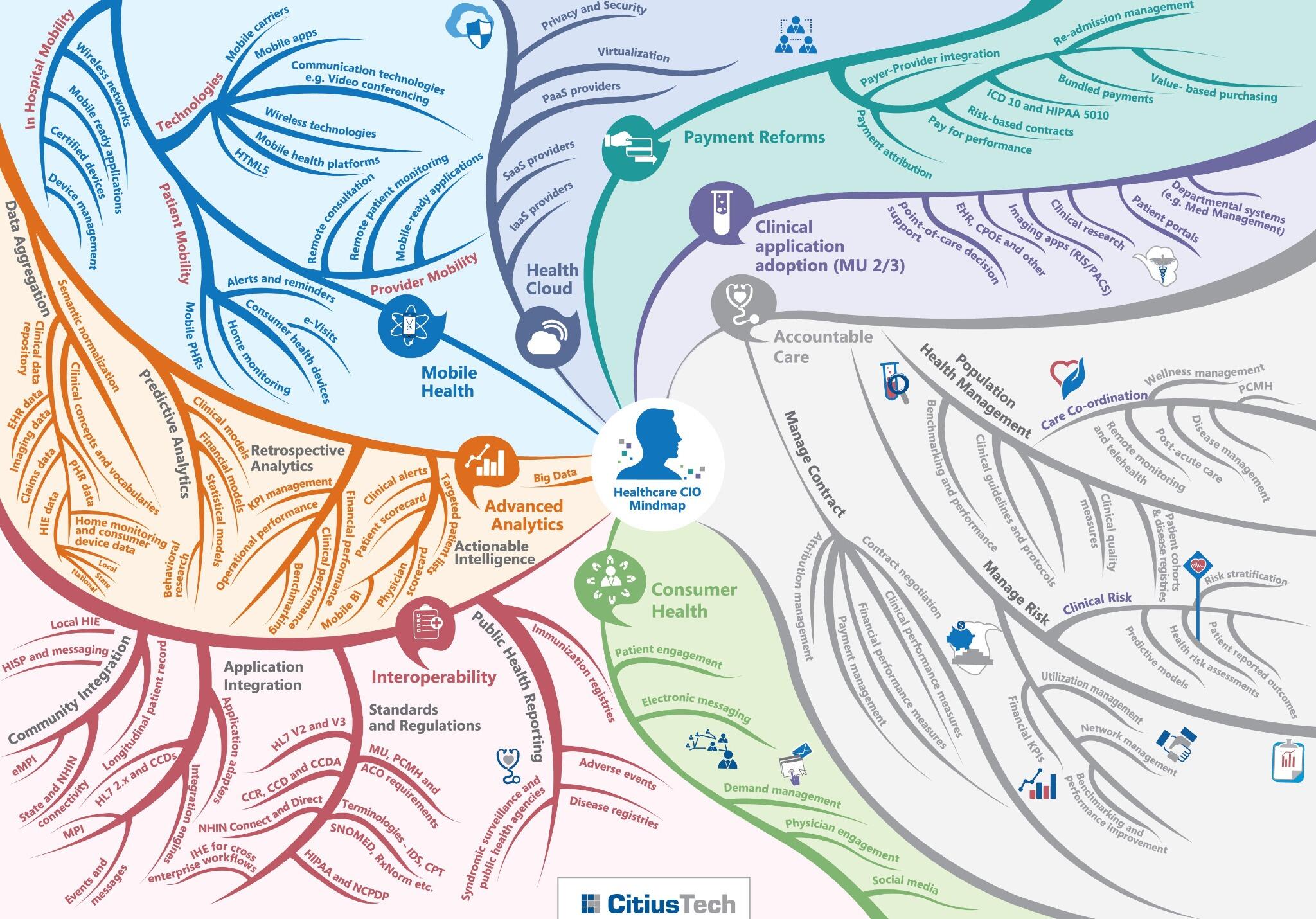
CIO mindmap
Changing role of CIOs A report from executive search firm SSi Search calls attention to the shifting role of CIOs in healthcare. The infographic highlights their wide-ranging responsibilities in the new order of healthcare assisting in defining and supporting new patient care models, new reimbursement models and supporting numerous regulatory mandates. Their roles will include analytics initiatives, building the clinical skill sets of their teams and seeking greater strategic involvement in their health systems.
TW_NBGH-Infographic-Web600px-NA-2014-34364-v8.indd
Digital health to control costs A Towers Watson survey of 597 employees looked at how employers are using and could use digital health to control healthcare costs. It noted that more than half are tweaking their employer plans to reduce healthcare costs, particularly with telemedicine. About 37 percent of employers said they plan to offer telemedicine by 2015 and another 34 percent said they are considering adopting it by 2016 or 2017, according to the report.
emerging tech roadmap by Barkley
Emerging technology The “Technology Roadmap” from Barkley’s Innovation Lab isn’t so concerned with healthcare trends so much as the future of technology. It does highlight areas that healthcare is only beginning to explore more widely, such as 3D scanning, biometrics, and augmented reality.
DebMed Infographic Hospital Hand HygieneHand hygiene Remote monitoring was a hot discussion topic this year as was the subject of reducing hospital acquired infections. An infographic from Debmed combined them as part of a survey of hospitals. About one third of hospitals said they were considering a monitoring system purchase to confirm whether employees were washing their hands properly.

Saturday, 3 January 2015

Pinterest Trends in 2015

I have a Strong Feeling Pinterest  is the way to go in 2015.
A year where we will see more men going this Network ….
A year where visual, videos will be the Trend on Social Media and especially on Mobile devices...

https://magic.piktochart.com/editor/piktochart/4018989

Friday, 2 January 2015

10 Ways Content Will Change in 2015

Content marketing is still among the most effective ways for brands to gain visibility. The right type of content has the ability to rank prominently in search results, earning shares on social media and making a name for the business behind it. As with other types of marketing, however, the type of campaigns that are effective can change from year to year.
In 2015, content marketing will continue to evolve as brands find new ways to reach customers using the devices and websites they’re interacting with most.

Visual Continues to Dominate

As the competition for customer attention continues to heat up, infographics, photos, and videos will be essential supplement to every piece of content. A recent survey found that nonprofits rank higher than for-profit organizations in their content marketing strategies, with 63 percent reporting they are currently working on visual content as part of their marketing strategies.

Personalization is Everywhere

As data analytics gradually becomes an integral part of major business decisions, savvy marketers are learning to use analytics to structure successful content marketing campaigns. In 2015, businesses will begin to feel the pressure to study customer behaviors and craft informed content marketing strategies to remain competitive. A customer will be served content that meets his own personal preferences rather than being part of a marketing blast that likely won’t capture his attention.

Mobile-Friendly is a Must

Mobile device usage passed PC use in 2014 for the first time in history. Recognizing this, brands are adjusting their content marketing campaigns for smaller screens and short attention spans. Content will be designed to be read on small screens, with localization and location-based search terms reaching peak importance.

Narrative Science Will Replace White Papers

In 2014, many businesses focused their content marketing efforts on long-form technical documents like white papers and case studies to attract consumers. 2015 will see an increased focus on narrative science, where data is used to tell a story in an engaging manner, with numbers updated as they change.

Customers as Storytellers

Case studies demonstrate the effectiveness of storytelling from a business’s existing-customer perspective. In 2015, brands will build on this, letting customers share their own personal stories about a product or service. This not only humanizes the experience and makes it more relatable to readers but it takes some of the content creation work out of the hands of brands, allowing them to simply clean up the content and post it.

Cross-Platform Content Marketing

Dashboard services may make it easy to post one social media update across multiple platforms, but content marketers now see the value of personalizing each post. From guest blogs to articles to tweets, brands will begin to personalize their content marketing efforts in order to reach different demographics in different ways.

Interactive Applications for Product Storytelling

Interactive storytelling will become an integral part of product demonstration, especially at events like expos and conferences. Brands will find ways to use interactive 3-D product models and well-crafted content to engage customers and give them a taste of a product without actually having the product on site.

Collaborative Marketing

Guest blogging has suffered some bad press in 2014 due to some unsavory practices that resulted in multiple spammy links. There is still a valid use for content marketing, both for gaining prominence in search rankings and growing your audience by meeting new people on other websites. In 2015, professionals will continue to see the benefits of working with others in the industry, whether it’s to share information on social media or to spend a day guest blogging on each other’s sites.

Competition Heats Up

There is a growing awareness of the value of content marketing that will have a definite impact on the business playing field in 2015. Businesses will be forced to be more inventive in their strategies as competitors launch their own content marketing strategies.

Content Campaign Measurement

Analytics will power personalization, but they will also become increasingly important to every marketing campaign. Businesses will learn to measure and adjust with each new blog post or social media update. With more tools available for measuring campaigns, this will become easier than ever in 2015.
As a new year begins, businesses of all sizes are already preparing this year’s marketing campaigns. By using the many tools available and working to create unique content campaigns, brands can continue to get their names out there in order to connect with customers.

Thursday, 1 January 2015

15 Premium Tips To Get Media Coverage In 2015

15 Premium Tips To Get Media Coverage In 2015 image newspaperglassespurchasedfromcanvadec232014.png
How To Get Media Coverage For Your Business?

The reason it’s hard for your start-up to get media coverage is because of noise.
Take the app market. As of June 2014, there were 1.2 million apps in iTunes.
Imagine if just a quarter of them contacted a reporter on the same day as you. That’s several hundred thousand companies!
In fact, your email to Alyson Shontell of Business Insider about your new app feature is probably sitting unopened next to 299 others just like it in her inbox that she received that day.

So in order to get some attention, you need to intelligently contact the media.
Here are 15 timely tips to help your start-up get journalists’ attention in 2015. They come from my experiences with Bloomberg, Business Insider, Buzzfeed, KQED, Mashable, TechCrunch, San Francisco Chronicle, Thomson-Reuters, Wired, Wall Street Journal and others.
1. MAKE YOUR KEY POINT FIRST.
In a note to a reporter, don’t bury the lead. When you land a media interview, say your main point first. Don’t plan to show a 45-page presentation.
2. KEEP IT SHORT.
A reporter receives 100 to 300 e-mailed pitches a day. Their voice mail boxes fill up fast. A short email might get read fully. To add detail, include a link. My Stanford media relations instructor and former San Francisco Chronicle Writer Marshall Wilson said a sentence should be no longer than 27 words. Key messages should take no longer than nine seconds to say.
3. READ THEIR STORIES FIRST.
Before Pam Edstrom attended her first media event with Bill Gates back when both their companies were just getting started, she read all of the industry magazines first. She then had intelligent talks with the journalists there. She is co-founder of public relations firm Waggener Edstrom.
4. PITCH THE COMPETITION.
KQED’s Peter Jon Shuler spoke in my Stanford post-graduate media relations class. He said he’s not likely to cover a story twice. Don’t call him and say, “I see you covered topic x. My company is a fit for that.” Instead pitch someone who hasn’t done the story yet, like a reporter at a competitive outlet.
5. OFFER SOMETHING SPECIAL BUT NOT TO EVERYONE.
TechCrunch takes contributed stories but they won’t run something unless it offers a unique viewpoint.
6. BOUNCE BACK AFTER FAILURE.
Great media relations folks don’t let rejection get them down. The timing could be off. It might take a year of relationship-building to land a shopping app in Good Housekeeping, for example, as was the case with one of my clients.
7. CONTACT THE RIGHT REPORTER.
If your story relates to new B2B social marketing software, contact the Huffington Post social business writer not the Elite Daily political blogger. Check Twitter profiles for updated job details. Some change jobs a lot.
8. PRETEND YOU’RE TALKING TO YOUR GRANDMA.
Skip the jargon like “mission critical” and just say what it is or does. If it’s a storage device that stores 500 movies just say that. Pretend you’re talking to your grandmother.
9. GO PLACES.
To increase your chances of meeting journalists, go out and get noticed. Give a talk at an industry conference or at a Meetup. Travel to a city where reporters are based. I set up a meeting with Issie Lapowsky of Wired and a Silicon-Valley based client recently and a cool story resulted.
10. TELL A COMPLETE STORY.
Compelling stories have a beginning, middle, end and hero. Include one when you are talking to a reporter. Overcome the fact that company founders do not like to highlight client problems. The story surrounding Sony’s movie “The Interview” features a big problem.
11. TELL A STORY THAT TUGS AT THE HEART STRINGS.
An app client tested a new nearby deals app feature before issuing an announcement. The story highlighted in communications was about a mom struggling to makes ends meet who was able to afford Christmas presents for her kids. It got attention. Another client’s story was about how he had three open heart surgeries by age 19. Staying healthy was the inspiration for co-founding his fitness app company while still in school.
12. ANNOUNCE NEWS BUT MAKE IT TIMELY.
Your campaign needs to fit in with what’s happening in the world. Right now it seems to be Sony movie “The Interview,” holiday shopping or New Year’s resolutions. A week ago it was Bill Cosby. Soon it will be losing weight, fitness, Super Bowl 2015 and Valentine’s Day. In August it will be back to school.
13. USE THE ELEMENT OF SURPRISE.
Snapchat, the “disappearing message” app got a life time worth of publicity by rejecting Facebook’s acquisition offer of $3 billion+. This was a surprise just due to the sheer amount. After that, everyone knew who they were. Reporters love to be surprised.
14. MAKE IT VISUAL.
Always have a photo of the founder, app screen shots and other graphics handy. Infographics and videos are popular. For social media posts, use a free graphics tool like Canva. Hire a news-smart photographer like Silicon Valley’s Mark Hundley or Paul Sakuma for your PR photography.
15. WRITE IT YOURSELF.
Some outlets like Buzzfeed, TechCrunch, and Wired accept contributed material. My blog is syndicated on a popular website. If your article is good, it will be promoted to home page. Venture Capital Firm General Catalyst Partners is known to be awesome at getting its own material published. It’s because the vice president of marketing communicates like a journalist.
In any case, if you try these tips and are still having a hard time, hire someone with media experience to help.

http://www.business2community.com/public-relations/15-premium-tips-get-media-coverage-2015-01108688

Saturday, 20 December 2014

10 Brilliant Strategies For Writing Viral Content


There are certain websites, writers, marketers and content creators who seem to rule the internet. Everything they put out there seems contagious, capturing an audience of millions and sparking conversations on social media.
These days, unpacking the secrets to viral success has been the mission of researchers, media organizations and businesses alike. After all, infectious content leads to major rewards in the form of readers, subscribers, advertisers, raising awareness for an important issue, brand recognition and financial success.
If you’re looking for ways get people talking, check out these 10 strategies from the experts themselves.
"Grumpy Guide To Life: Observations From Grumpy Cat" Book Event At Indigo
Grumpy cat. (George Pimentel/WireImage)
1. Write good content
Bottom line: Tell a good story and tell it well. Readers qued)
There are certain websites, writers, marketers and content creators who seem to rule the internet. Everything they put out there seems contagious, capturing an audience of millions and sparking conversations on social media.
These days, unpacking the secrets to viral success has been the mission of researchers, media organizations and businesses alike. After all, infectious content leads to major rewards in the form of readers, subscribers, advertisers, raising awareness for an important issue, brand recognition and financial success.
If you’re looking for ways get people talking, check out these 10 strategies from the experts themselves.
"Grumpy Guide To Life: Observations From Grumpy Cat" Book Event At Indigo
Grumpy cat. (George Pimentel/WireImage)
1. Write good content
Bottom line: Tell a good story and tell it well. Readers quickly abandon stories with weak content and bad writing.
Begin by making sure your story clearly communicates the five W’s: Who? What? Where? When? Why? This grounds your reader in the story’s basic premise and why it matters.
Guy Kawasaki and Peg Fitzpatrick, co-authors of The Art of Social Media: Power Tips for Power Users, explain in a recent Harvard Business Review articlethat stories should accomplish one of a number of tasks: explain what happened, explain what something means, explain how to do something or surprise the reader.
2. Elicit strong emotions – positive is better than negative
Stories that evoke intense emotions tend to drive popularity, according to a 2011 study by University of Pennsylvania professors.
Content that triggers “high-arousal” emotions performs better online, whether those emotions are positive (like awe) or negative (like anger or anxiety). Whereas content that sparks “low-arousal” emotions (like sadness) is less viral, write Professors Jonah Berger and Katherine L. Milkman, who studied the viral nature of New York Times articles over a three-month period. And though there’s much complexity at play, in general, “positive content is more viral than negative content.”
When Jack Shepherd, editorial director at BuzzFeed, wrote 21 Pictures That Will Restore Your Faith In Humanity, it generated millions of hits. The list evoked the emotion felt when “you’re in the presence of the triumph of the human spirit,” says Shepherd. Today it has 15.4 million views. (Full disclosure: Shepherd has been a friend for years.)
“When people share something like that, they’re not just sharing the story, they’re sharing the strong, positive emotional experience they had. You can’t really fake that,” says Shepherd. For more tips from Shepherd, check out the companion piece, BuzzFeed’s Guide To Viral Content (Cats Optional, But Encouraged).
3. Be brief
Get to the point quickly and keep the reader interested.
“Our experience is that the sweet spot for posts of curated content is two or three sentences on Google GOOGL +1.56%+ and Facebook and 100 characters onTwitter TWTR +3.26%,” say Kawasaki and Fitzpatrick.
“The sweet spot for created content is 500 to 1,000 words.”
4. Write irresistible headlines
Headlines are the gateway to a story – your one chance to pique your reader’s curiosity and convince them to stay with you. Headlines can make a story a smashing success or a total flop, even if the content is fantastic.
Capture your reader’s attention with headlines that
- Clearly and concisely state the article’s purpose
- Use intriguing adjectives
- Communicate the value and ease of the story
In other words, tell your readers upfront that they’ll be getting a lot out of your story with little effort on their part. (For example, my headline This One Smart Habit Can Slash Your Airfare told readers that they could save a lot of money by learning one habit. Tons of value and so simple.)
Twelveskip.com offers this list of eye-catching title templates that will help you develop great headlines.
5. Be visual
Visual content increases engagement. So pair that compelling headline with a striking visual. Always. This is key to capturing reader interest.
Buzzsumo, a content analytics company, found that having at least one image in a Facebook or Twitter post leads to an average of twice as many shares compared to a post without images. A study by content marketer Skyword found a similar correlation between images and engagement, write Kawasaki and Fitzpatrick. “Total views of its clients’ content increased by 94% if a published article contained a relevant photograph or infographic, when compared to articles without an image in the same category,” the co-authors write.
6. Play the numbers game
The more you post, the greater your chances at going viral. Neetzan Zimmerman, who the Wall Street Journal called possibly “the most popular blogger working on the Web today” blogged for Gawker until 2014 and routinely drew the most unique visitors to the popular site. In an interview with HubSpot.comZimmerman shared that he posts 10 to 15 times per day. Not every post went viral, but the larger the volume of stories, the greater the chances of one taking off.
And don’t stop once your work is out there. Promote it actively on social media and do so repeatedly on different days at different times so you can capture different audiences. Tailor your posts for the social media platform.
Sure, you may lose some followers who don’t like repeat shares. But Kawasaki and Fitzpatrick found that this practice pays off. “When we decided to test the effect of repetition by sharing four identical posts with four different links to track clicks, we got about 1,300 clicks on the first, roughly the same on the second, 2,300 on the third and 2,700 on the fourth, for a total of 7,600 clicks. Would you be willing to risk complaints about repeated tweets to achieve 5.8 times more clicks?”
7. Play nice with others
Give credit where it’s due by linking to sources you site in your articles. “Links send traffic to the source as an act of gratitude; enable readers to learn more from the source; and increase your visibility and popularity with bloggers and websites,” write Kawasaki and Fitzpatrick.
And keep the gratitude flowing after your work is out there. Thank and retweet those who tweet your content. Follow them back. Retweet and favorite their stories. Offer thoughtful comments. Be engaged.
8. Study your stats
Check out how your stories compare against each other. What works? Why?
Pay attention to the stories that flopped and think about tweaks that could have made them better.
9. Time the release of your stories
Zimmerman recommends posting at 9 a.m. and noon EST. At 9 a.m. you’ll capture workers reluctant to dive into work at the start of the day.
At noon, you’ll capture West Coast workers arriving to the office and East Coast workers on their lunch break.
10. Give the reader a practical takeaway
You’ve written a compelling story with an irresistible headline. Now read over it and make sure it includes practical, actionable takeaways.
A key component of contagious content is getting readers to share content with their friends and followers. And since everyone from journalists and marketers to high school students to your aunt on Facebook is crafting their online brand, readers are more likely to share material that they find useful and makes them look good.
Demonstrate the value of your content, and watch your numbers soar.

Friday, 12 December 2014

Are Infographics Right For Your Business? The Pros, Cons, And Tips

Infographics are creative, educational, attention-grabbing, and can be a powerful marketing tool, but are they right for your small business? To help you answer that question, we explain the pros and cons. and have actionable tips to get started.
The pros
Infographics serve as great pieces of content marketing. They can relay otherwise dry statistics in a more compelling way, are super shareable and can help readers visualize information and relationships. Take a look at the example below. Statistics come to life. They’re easy to interpret, explains Carla Mattioli, a creative consultant with IM Design.
Are Infographics Right For Your Business? The Pros, Cons, And Tips image graphic1 im design.jpg
“As a graphic designer, it’s my job to produce layouts that will capture a reader’s attention,”she explains. “In this world of instant gratification, infographics allow me to display facts and figures in a way that satisfies an audience’s need for quick and easy-to-read information.”

Read more at http://www.business2community.com/infographics/infographics-right-business-pros-cons-tips-01083989#dTyEw5fuDS3YKZXx.99
Infographics also:
  • Diversify your marketing tools
  • Appeal to visual learners in your audience
  • Increase social engagement as your followers share your infographic
The cons
In most cases, good infographics require a bit of design experience. After all, there’s an art to relaying a lot of information in a small space. It’s not just about choosing precise wording or statistics; it’s also about placement, color choices, font size, style, and images.
We know that a lot of small business owners may not have an in-house graphics or creative team, or the resources to hire a specialist. For a lot of small businesses, that’s the major downside to creating infographics. However, there are DIY tools that can help.
DIY infographics tools
If you’d like to try creating infographics yourself, there here are a few tools to use.
  • Piktochart allows you to pick themes from its gallery, customize your infographic with intuitive editing tools and share it on social media or export it to SlideShare or Evernote.
  • Easel.ly is a free web-based tool that allows you to choose from infographic templates, then customize them in an easy-to-understand format.
  • Venngage not only offers tools for creating and publishing infographics, but it also allows you to animate them.
Are Infographics Right For Your Business? The Pros, Cons, And Tips image screen shot 2014 11 21 at 3.30.09 pm.pngTypes of info graphics
To create an infographic doesn’t mean you must only use stats and data. So what should or can you create infographics about? Here are some angles:
  • Educational: Educate your audience. For example, non-profits can create a timeline that explains how the organization got its start. Service-based businesses can showcase information from a survey that highlights customer satisfaction. We’ve created several educational infographics portraying a variety of digital marketing best practices.
  • Statistics: Any time you have a glut of numbers, make them easy to digest in an infographic. For example, non-profits can breakdown donation statistics. Small businesses can highlight common problems like this plumbing company does.
  • Comparison: Compare statistics. A non-profit, for example, could compare the level of need in the community today versus five years ago. A small business could compare the cost of materials to help customers make an informed decision.
  • Guides: Create a visual guide. Consider making a beginner’s guide to a topic that’s relevant to your business or nonprofit. Here’s a Beginner’s Guide to Sushi.

http://www.business2community.com/infographics/infographics-right-business-pros-cons-tips-01083989