Showing posts with label social media tools. Show all posts

Thursday, 30 April 2015

Don’t be a humblebragger, just have a good old-fashioned boast

Woman yelling into megaphone
 The Harvard study found that sincere complaints, without an agenda, were viewed more positively than a humblebrag. Photograph: Jamie Grill/Getty Images
It may come as news to you, but it didn’t to me, because I, for one, figured it out a long time ago: humblebragging doesn’t work. As an impression-management technique, it’s both transparent and ineffective. In fact, according to a new study from Harvard Business School, you are better off just bragging.
If you have never heard the term before, the authors of Humblebragging: A Distinct – and Ineffective – Self-Presentation Strategy have defined it as “attempting to mask a brag with a complaint”. The idea is that by setting your self-promotion in the context of a world-weary moan, you will somehow disguise its shamelessness.
It is a popular strategy on social media – a typical and oft-repeated example from Twitter goes something like this: “Ugh – Amazon just recommended my own book to me! Already read it, thanks!” It is clear in this instance that the tweeter is trying to couch a boast (“I have a book out, and Amazon recommends it!”) within a gripe (“Amazon’s algorithm has made a silly, if understandable mistake”). In this case, the humblebraggart’s true motivations are all too apparent. And also, so what? Amazon recommends my book to me at least once a week. Why wouldn’t it? It’s great!
According to the Harvard study, humblebraggarts are viewed more negatively than regular braggarts, although neither group is viewed as positively as people who just complain about stuff with no other agenda. The latter two groups are seen as being, at the very least, sincere.
Tim Dowling
 Tim Dowling, author extraordinaire. Buy his book. It’s great. Photograph: Sara Lee for the Guardian
The study uncovered another trove of humblebragging in the classic job interview question: “What is your biggest weakness?” You might as well call it the No Arseholes Need Apply question: since modesty is seen as a positive quality, and weakness a bad one, it encouraged 77% of participants to answer along the lines of, “Well, it’s hard for me to work in a team because I’m such a perfectionist.” Wrong.
Would-be applicants were actually viewed more positively when they admitted an actual weakness, because it seemed to indicate a certain integrity. The humblebrag combines boasting with glaring insincerity, which causes those deploying the technique to be less liked and, presumably, less hired.
One might argue, of course, that incompetence is the real crime of the humblebraggart. In fact, I am arguing that, and I am always right. The true definition of humblebragging takes into account its transparency, and the failure of practitioners to cloak their neediness. If you can’t hide your agenda, you are not using social media properly. The authors of the study may be markedly less clever than me, but their conclusion is clear: complain if you will, brag if you must, but keep the two separate. As if that isn’t just stating the bleeding obvious. Buy my book!

Saturday, 14 March 2015

Creating images for social media with Canva

paints colour images drawing design
Credit: By sayot on Flickr. Some rights reserved.
Posts with images on social networks often attract more engagement than text-based updates, so if you need to spruce up your social channels, posting more images is a good way to go about doing that.

But each social network has its own requirements in terms of format, and there's no one-size-fits-all for social networks.

There are a number of tools online that can help you create bespoke images for the various social networks journalists use to share their stories – Canva is one such platform.

It caters to users who need an easy way to design images in a number of styles, from Instagram or Facebook photos to Twitter headers and Pinterest images, and even email headers you could use in newsletters.

Many of Canva's design tools are free to use, and you can access most of its library of templates, fonts and even images for free. Certain elements however are paid-for, and usually cost $1 each (payable when you download your finished image).

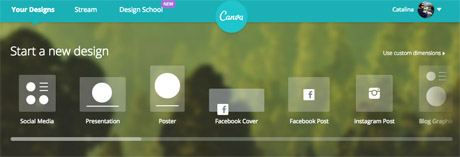
You will need to create an account to use Canva, or log in with your Facebook account. Once you're in, you can choose the type of image you want to create from the pre-existing formats, or you can choose a custom size to work with if you're creating images for your site.

canva format options
Screenshot from Canva.

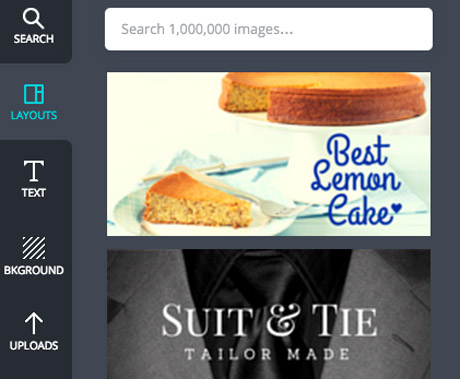
Once you've chosen your size, you can find Canva's design options on the left hand side.

It automatically takes you to the 'layouts' tab, where you can find a number of free templates for images with quotes.

But you can also create your own from scratch, uploading your own images to Canva and using the "background" and "text" options.

canva options
Screenshot from Canva.

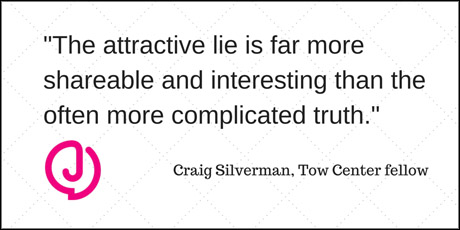
We tested the platform to create a basic image that could be used in a Twitter post, using a pull quote from our story Study: News outlets not doing enough to stop online rumours published last week.

The first step is to choose a background image or colour by clicking on the 'background' tab. The plus sign at the top opens up the colour wheel where you can find your preferred colours.

Alternatively, you can also choose one of the backgrounds provided, including free and patterned options.

Next, we uploaded the Journalism.co.uk logo, as a PNG with a transparent background, to add to our test image.

Canva allows you to either upload images from your computer, or use photos from your Facebook albums.

Once a photo is uploaded, you can drag and drop it onto your work-in-progress, resize it by dragging the corners of the image, and position it where needed within the frame.

There are plenty of ways to add text to your image, and the 'text' tab offers some basic title options as well as a number of designs if you'd like your text formatted in a more visual way.

For the quote in our image, a combination of the main title and subtitle features worked well enough, but you can also customise fonts and colours for free.

Here's the result:

test canva demo
Twitter image, resized to fit Journalism.co.uk site layout.

For more complex designs, or if you want to create infographics or illustrate statistics for social media, Canva has a number of icons and images you can use.

Click on the 'search' tab to access the platform's library of visuals, including shapes, maps, doughnut charts with percentages, and more icons to make your post stand out on social media.

Don't forget to represent your data accurately, and while Canva's design options are plentiful, don't overload your graphic. Check out these tips from freelance infographista Lulu Pinney on what makes infographics successful.

Once you're happy with your photo, you can download it or share it on Twitter, Facebook or email.

The Canva team also writes blog posts with useful tips for designing images for social media, general graphic design advice and more on their Design School blog.
https://www.journalism.co.uk/news/how-to-create-images-for-social-media-with-canva/s2/a564104/

Saturday, 27 December 2014

4 Brands Using Holiday Pinterest Gift Ideas To Create Sales

Tis’ the season for pinning! Whether you are looking for a DIY ornament project or need the recipe to your favorite treat, Pinterest is one social media platform that allows you to easily find both. Beyond crafting and cooking, Pinterest is also one of the top resources for shopping this holiday season. Recently, Curalate ran a study to detect the most popular item on Pinterest and found that a pair of J.Crew camping socks were the hottest item on the site. The study also showed that 3 out of the top 5 items in their study were sold out in the color that was pinned. Given the visual nature of Pinterest, it makes for an effective marketing tool for e-commerce and retail companies.
Out of all the major social media networks, Pinterest users spend between $140 – $180 in the online check out as opposed to Facebook and Twitter users who spend around $60 – $80. To fuel the shopping machine, nearly 79% of department stores have Pinterest accounts and are running campaigns on the platform during 2014.
Throughout the year, Pinterest has made its site more appealing for brands and has added features that allow more measurable goals to be set for this year’s holiday campaigns. The addition of Promoted Pins and easy access to account analytics data for business accounts allows brands to easily assess their ROI and improve their strategies.
Overall, brands on the Pinterest are taking advantage of the platform to feature holiday gift guides and act as a helpful resource that aids the shopping experience for users. While every company has approached their gift guide differently, there are a few that have really differentiated themselves from the competition to make it on to my “Nice” list when it comes to Pinterest:

J.Crew

J. Crew’s plan to improve the gift giving ability of their customers is exemplified by their “Gift (Better) Guide” boards. The brand has hand selected the best recommended gifts for any age on your holiday gift list.
Recommended for YouWebcast: The Art of Growth Hacking: Gaining Early Traction by Doing Things that Don't Scale
4 Brands Using Holiday Pinterest Gift Ideas To Create Sales image p.2.png 600x444
This helps J. Crew to make the purchasing process much more straightforward for potential customers. As opposed to just showing the best products for a general audience, J. Crew is able to segment its audience into appropriate categories before they even get to their online store looking to buy a product.

Nordstrom

Nordstrom was the most engaged brand in Curalate’s study with over 68 boards and 21,000 pins – pretty impressive for a brand that is normally considered a high-end department store. They took a different approach to the holidays and have been curating boards that identify with personality types and common interests, so you can shop specifically for that special someone.
4 Brands Using Holiday Pinterest Gift Ideas To Create Sales image p.1.png 600x447
In addition to the personality boards, Nordstrom also has their “Top Pins” and “Favorite Things” boards to help shoppers easily see what others are purchasing. Just like J. Crew, Nordstrom uses their board not just as a place to show their most expensive products to a general audience, but to really understand their audience and cater to specific products for each demographic.

Etsy

With so many creative merchants, Etsy has a lot of products to choose from and feature for the holidays. Their Pinterest campaign this season consists of boards that their merchants have curated as the best of the best from Etsy. In addition to these holiday boards, Etsy has created “Etsy City Guides” that feature brick and mortar stores unique to each city. With 39% of shoppers using their mobile device to find a local retailer through a search engine and 28% checking for availability of items at specific retailers, Etsy capitalizes on this demand for local retailer information. With these boards they are able to seamlessly tie the shopping experience from Pinterest all the way through to actual stores, all while creating a great strategy that caters to specific geographical regions.
4 Brands Using Holiday Pinterest Gift Ideas To Create Sales image p.3.png 600x446

Target

This corporate superstore giant also took to Pinterest for the holidays and built upon the ever popular “Elf on the Shelf” tradition by giving customer ideas on what they can do with their elf this season. Some of the ideas are very funny and if you need a laugh on your lunch break they are worth taking a peek at. Below is a screen shot of a couple of them:
4 Brands Using Holiday Pinterest Gift Ideas To Create Sales image p.4.png 600x481
Unlike a lot of other retailers, Target is using Pinterest this holiday season to provide users with “Elf on the Shelf” content first. As opposed to making their Pinterest a vehicle that effectively converts traffic from the get-go, they seem to focus more on attracting new and existing users to the page first in order to build brand loyalty among users. It is only after users get to their page that some of the more straightforward shopping tactics on Pinterest that regular retailers are using are put to work. It’s a great strategy, and is a creative blending of the more established content marketing one would normally see on a website’s blog with Pinterest’s platform.
With one week until Christmas, all of the marketing cards are being laid out on the table by companies around the world. What is the most interesting Pinterest campaign you’ve seen?

http://www.business2community.com/pinterest/4-brands-using-holiday-pinterest-gift-ideas-create-sales-01102140

Wednesday, 26 November 2014

Overview of the 3 Great Social Media Management Tools

Overview of the 3 Great Social Media Management Tools image man 404376 640
Social media evolved from mere fad status to one of the most effective online marketing tools available for businesses of all sizes, industry and targeted demographics. Up to 92% of marketers are using social media marketing and claimed that it helped their business in 2014 in various ways including significant increases in website traffic.
Now, more than 97% of these marketers use social media but only 15% are sure that they are using the right social media management tools. Business owners should make it a point to learn more about the various social media tools available to them before they invest their time and resources, and implement these tools within their own marketing campaigns – and you can start with these three great tools presented here.

Oktopost

If you need a cost-effective social media marketing tool that will help you manage and track the publication of messages, help you engage with prospects efficiently and generate the leads your business needs, then you can go for Oktopost. It’s packed with a lot of features: from tracking clicks to sales conversions right down to individual posts, allowing you to get real insights of your true social media ROI. Streamlined for B2B social media, Oktopost will work best in generating the most traffic and conversions from your LinkedIn marketing campaigns.

Features:

  • Manages the posting of messages to multiple profiles on Facebook, LinkedIn, Google+ Pages and Twitter, allowing you to schedule future post right down to minute level
  • The Autoposter feature that allows you to schedule and control your whole social media marketing campaign with the click of your mouse or a tap on your screen
  • Posts and messages that contain links can be automatically tracked
  • Conversions that occur on your website or landing pages can be tracked down to the original post or tweet that generated the inbound click that brought visitors to the page
  • You can easily respond to comments and re-tweets directly from Oktopost through the Social Inbox feature

The Pros:

  • Better Message Management – Oktopost allows users to create a library or repository of messages, including pre-approved posts and tweets that you can use for scheduled future postings through the Autoposting feature
  • Integrate all social communications through the Social Inbox – Through Oktopost’s Social Inbox, you can view, keep track, respond and manage all your communications from within the social media management tool itself
  • Track Individual Campaigns through Analytics – You can track the performance of individual campaigns directly from Oktopost’s tracking dashboard, or you can integrate external applications like Google Analytics and gain detailed insights about the performance of your posts, clicks and conversions across all your social networks

The Cons:

Oktopost users feedbacked very little negative comments about this social media management tool, except for minor suggestions like more powerful browser extensions, grabbing of images directly from the source page when inputting a URL, and the ability to cross post between networks.

Read more at http://www.business2community.com/social-media/overview-3-great-social-media-management-tools-01071337#SfFtrlYDyQzr4T8o.99

Pricing Schemes:

Oktopost offers a free trial without any credit card required, after which you can avail of paid subscriptions ranging from:
  • Starter – $49/mo
  • Marketer – $119/mo
  • Business – $249/mo
  • Enterprise – need to discuss with them

What It’s Best For:

Although applicable to other social networks, Oktopost is targeted more towards maximizing social media marketing impact on LinkedIn, particularly on LinkedIn Groups which are some of the most under-utilized marketing channels in social media.

Hootsuite

If your social media marketing team needs more collaborative functionalities for executing your brand’s social campaigns across various networks that include Google+, Facebook, Twitter and LinkedIn from a single online dashboard, then Hootsuite would be the best social relationship platform for your business.
Overview of the 3 Great Social Media Management Tools image hootsuite

Features:

  • Manage multiple profiles and pages on Google+, Facebook, Foursquare, LinkedIn, Twitter, and WordPress from a single web-based dashboard
  • Scheduler with calendar updater and spreadsheet uploader
  • Team collaboration where you can track, mark and delegate messages, tweets and replies
  • Mobile app support for Android and iOS
  • Scheduled reporting with customized analytics
  • Ability to post updates through RSS integration

The Pros:

  • All your company departments can collaborate with one another and manage their social network profiles and pages, engage with targeted audiences and customers, and most importantly generate revenue using any devices available within a secured and easy-to-use environment
  • Business units can easily coordinate with one another in posting and promoting messaging through Hootsuite’s scaleable content management features
  • Business owners and their social media marketing executives can gain valuable insights from comprehensive social data and analytics that will help you make critical business decisions and corresponding actions

The Cons:

Some Hootsuite users reported a few items where the application could further improve the performance of this social media management tool:
  • The free version of Hootsuite allows for 2 free reports that you can use, after which you need to pay for reports, using points that you earn through an equivalent dollar value
  • URL shorteners are important in social media marketing but in Hootsuite, you are limited to only ow.ly and ht.ly. You can however use custom URL shorteners of your choice which you pay for per month or per year
  • Other users encountered image problems when posting or sharing links to their Facebook pages when they use RSS feeds or the bulk scheduler. Aside from that, other issues include no analytical data in Facebook Insights when posting new content through Hootsuite

Pricing Schemes:

Hootsuite offers a free version as well as a pro version which you can avail for $8.99 per month. Enterprise versions are also available that caters specifically to the needs of professionals and businesses of all sizes.

What It’s Best For:

Hootsuite is very popular for use with various social networks, but is more popular as an ideal web-based Twitter client for its basic design for use with team collaborations, allowing individual team members to work directly on customer messages, replies, re-tweets, updates and mentions.

Swayy

If your social media management needs require you to have a steady stream of shareable content for your focused social networks, based on available options for your themes, subjects, schedules and other analytics options, then Swayy might be the perfect tool for your business. It can help you find great and engaging content that you can share with targeted audiences based on what is relevant to them and what is interesting to them.
 Overview of the 3 Great Social Media Management Tools image swayy

Features:

Swayy can easily be integrated with Facebook and Twitter, two of the most popular social media networks, allowing you to enjoy its many features which include:
  • Daily newsfeed that send you a list of news based on your targeted audiences’ interests
  • Stories fed to your dashboard are presented in Masonry style card layout that makes it easier to navigate
  • Stories are showcased based on two categories:
  • “Currently Trending in Your Circles” – content that is popular among broader subject categories that does not necessarily include, in greater detail, your targeted audience categories
  • “Based on Your Community” – categorized more accurately according to the subjects or topics your brand and targeted audiences are associated with
  • Suggested mentions and hashtags
  • Option to schedule tweets to a later time period

The Pros:

You can use the features of Swayy to your advantage just like the following:
  • Easily scroll and look at the stories through the visual design of the Daily Newsfeed allowing to select or exclude a particular content, giving you the option to choose and schedule your posts
  • You can easily select and pick the right content that would be relevant and interesting to your targeted audiences through a recommended list of topics. Paid versions would also allow you to specify the topics according to what is interesting to targeted audiences
  • You can immediately share your choice of content through the “share” function, or you can do so at a preferred later time through the “share later” function, allowing you to plan what you can post on subsequent days
  • Swayy also provides customizable options for analytics so you can track the likes, shares, types of content, and other social signals that are popular with your targeted audiences

The Cons:

Still relatively new compared to other services, Swayy is still focused only on Facebook, Twitter and LinkedIn and is not able to connect yet with Google+ accounts.

Pricing Schemes:

Swayy offers a free plan for a single Advanced Content Dashboard. If you need more dashboards or bring in a team, you can avail of the Pro plan at $9.00 per month, the Business plan for $49.00 a month, or the Agencies plan for $119.00 a month.

What It’s Best For:

Swayy is great for helping you curate and generate better and more targeted content that your audiences want, thus increasing engagement and interaction that will boost your social media marketing efforts.
By getting a deeper insight into the workings of social media management tools, you can learn more about how these tools can help you deal with the chaotic social media jungle that your business may be in. But before you jump right in, it is vital that you first take a closer look at these three great social media management tools and learn how you can harness these tools, sync with and monitor all your active social media accounts, and make them all work for you for the good of your business.

Read more at http://www.business2community.com/social-media/overview-3-great-social-media-management-tools-01071337#SfFtrlYDyQzr4T8o.99